Sunday, October 18, 2026
How to Prompt GPT-6 Astra Pro's Parallel Agents in ChatGPT
Posted by
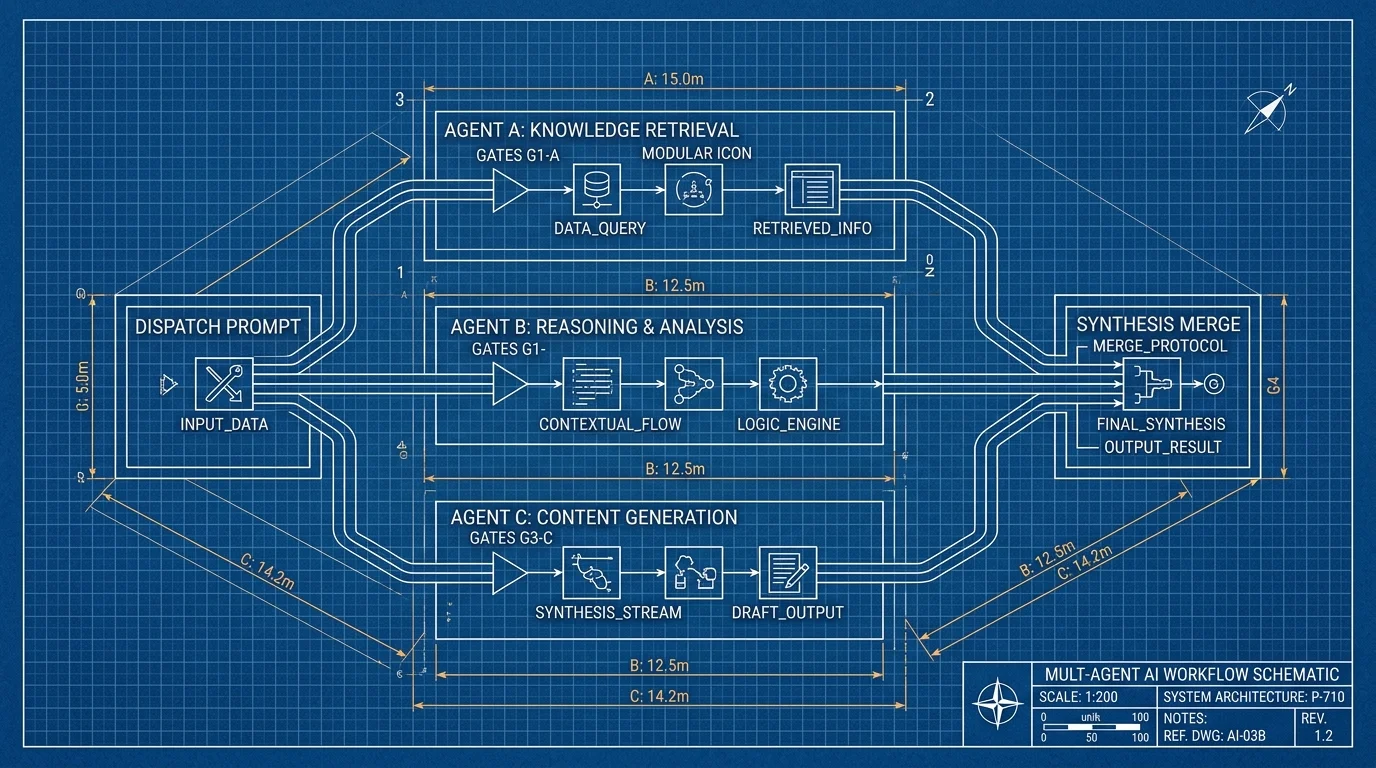
On October 16, OpenAI turned ChatGPT's Chat tab into a multi-agent runtime. The announcement: GPT-6 Astra Pro got faster responses and improved plugin/tool use, "and now, multiple agents can tackle different parts of a task in parallel. You can follow each agent's progress and open completed tasks to review their work." The ChatGPT release notes confirm the same three changes, rolling out to eligible Pro users.
The announcement, the release notes, and the help article are the whole paper trail — and none of them say how many agents a task gets, whether they share context, or how parallel runs count against your allowance. So the prompt — not the product settings — is where control lives. This post is about writing that prompt.
What "Multi-Agent" Actually Means Here
Three facts to keep straight, because the terminology is doing a lot of work:
- GPT-6 Pro is GPT-6 Astra. Per OpenAI's models help article, the Pro effort level in Chat is "powered by GPT-6 Astra." The upgrade lands on GPT-6 Pro, so the parallel-agents feature is an Astra behavior.
- It's a product surface, not a new API. The agents split work inside one Chat conversation. Developers who want programmatic multi-agent control still use the API — where GPT-6 Astra is priced at $10 per 1M input tokens and $50 per 1M output, with a 1,050,000-token context window.
- You can see the work. Each agent's progress streams in the conversation, and completed subtasks open for review. That visibility is your merge-review checkpoint — use it (more below).
Who Gets It, and What It Costs You
The feature is "now available to eligible Pro users in the Chat tab." Note what the plan table actually covers: GPT-6 Pro the model sits on Pro $100, Pro $200, Business, and Enterprise — but parallel agents were announced for eligible Pro users only, so the Business and Enterprise rows don't imply the feature. Plus subscribers get Astra in Work and Codex, not Pro in Chat.
The binding constraint is the allowance. GPT-6 Pro in Chat is limited to 200 messages per week on Pro $200 and 50 per week on Pro $100 (shared with GPT-5.6 Sol Pro); Business Standard gets 15 per month. When a Pro $200 account hits the weekly limit, ChatGPT auto-switches to GPT-5.6 Thinking at Medium. Since OpenAI hasn't documented whether a task fanned out to three agents consumes three messages or one, the safe operating assumption is that it consumes more than one — treat the allowance as the cost of parallelism and budget accordingly. Our agent cost-optimization guide covers the general discipline.
The Prompt Template for Parallel Work
OpenAI hasn't documented how a task gets split; what you control is whether the split is useful. A task splits well when its parts are independent, verifiable, and cheap to merge. It splits badly when each part depends on the previous part's output. Structure every prompt in four layers:
TASK FRAME
Goal: [one sentence, the finished deliverable]
Done means: [what "complete" looks like, concretely]

SPLIT DEFINITION
Part A: [self-contained subtask, no dependency on B or C]
Part B: [same]
Part C: [same]
Rule: each part must produce its output without waiting on
another part. If you find a dependency, do it sequentially
instead of splitting.

ROLE BRIEFS (per part)
Part A works with: [sources, tools, tabs, files]
Part A output format: [table schema / bullet list / code file]
Part A must not: [edit shared files, message anyone, spend]

MERGE INSTRUCTIONS
Collect each part's output in the conversation.
Before merging, list every claim a part made that another
part contradicts. Resolve contradictions by going back to
the source, not by averaging.
Final deliverable: [the one artifact I'll review].
Do not send, submit, publish, or delete anything.
Three template decisions deserve explanation:
- "If you find a dependency, do it sequentially" is the anti-fanout clause. Dependent parts are the worst case for parallelism: parts that wait on each other give you all of the cost and none of the speedup.
- Per-part "must not" lines are your stop conditions. In a single-agent chat, an overly broad action is recoverable; in a fanout, several agents can be acting at once. Restrict write-actions explicitly: "must not" anything that sends, submits, purchases, or deletes.
- "Resolve contradictions by going back to the source" targets the classic multi-agent failure: two agents return different numbers, and the merge averages them into one plausible wrong number.
Reviewing Completed Subtasks
The review step is where the feature earns its keep. Completed tasks open for inspection — check three things per agent before accepting the merge: (1) did the agent use the sources named in its brief, (2) does the output match the requested format, (3) did it stop where your "must not" line said to stop. If an agent went off-brief, reject that subtask and rerun it alone rather than accepting a merged result you can't untangle. Our parallel-agent orchestration concepts show a related review discipline for coding agents.
Where This Sits Against Other Multi-Agent Tools
The framing differences are worth knowing before you pick a surface. AI agent frameworks compared covers the programmatic options; multi-agent collaboration patterns covers the design space. ChatGPT's version needs no setup: multiple agents work on parts of the task in parallel, you can follow each agent's progress, and completed tasks open for review. Coding agents like Claude Code expose subagents you configure yourself — more control, more setup. For research-shaped tasks with clear independent parts (competitors, pricing, regulation — the market-scan pattern), ChatGPT's split is the lowest-friction option. For tasks where the split itself is the hard design decision, a configurable setup wins.
One more caution, this one from the September 3 "Introducing GPT-6 Astra" release note: Astra ships with "additional safety monitoring to look for cases where agents may not have interpreted your instructions correctly." The template's explicit split definition is your countermeasure; vaguer prompts push the interpretation work onto a fanout you'll then have to audit.
Side Note: Rosalind, and Why It's Not a Prompting Story (Yet)
The same 48 hours produced a second announcement worth demoting on purpose. On October 15, OpenAI opened the Rosalind Academic Plan — sponsored access to GPT-Rosalind, its dedicated life sciences model, for eligible labs at U.S. universities: up to 30 Business Standard seats free for up to 12 months, via a PI-led trusted-access application, with API access excluded. The thread confirms the 12-month sponsored-access structure.
There's no prompting angle to teach for most readers: it's restricted-access research tooling, not a product surface you can try. If you are a lab PI, the help-center mechanics (30-seat cap, .edu verification) are the operational detail that matters. Everyone else: file it under "frontier models are getting vertical" and move on.
What to Watch
Three undocumented behaviors will decide whether parallel agents are a speedup or a bill: how fanouts count against the weekly GPT-6 Pro allowance, whether agents share context or run isolated, and whether Business/Enterprise workspaces get the feature at launch (the release note says "eligible Pro users" only). When OpenAI documents any of the three, the template above changes — the anti-fanout clause and the cost assumption are both placeholders for those answers.
Related Articles & Deep Dives
 #chatgpt
ChatGPT Computer Use in Chrome: How to Prompt the Browser Agent
ChatGPT can now use your Chrome tabs. Learn the prompt structure that works for browser agents: task framing, stop conditions, and 8 copy-paste prompts.
 #openai
OpenAI's New Prompting Guide: Stop Overthinking, Start With the Result
OpenAI just published a refreshingly simple prompting guide that tells users to drop rigid formulas and complex instructions. The core message: describe your goal, add a constraint or two if needed, and iterate. Here's what's in it and why it matters for developers building on top of these models.
 #claude
Claude Opus 5 Wants Simpler Prompts — Delete Your Skills and Just Say What You Want
The most viral Claude advice of the week: Opus 5 performs worse when loaded with skills, MCPs, and step-by-step instructions. Here's what the 'simplified prompts' shift means and how to actually prompt Opus 5.