SkillOpt: Training Agent Skill Documents Like Neural Network Weights
Microsoft's SkillOpt treats a Markdown instruction document as a trainable parameter — applying gradient-free optimization to boost GPT-5.5 by +24.8 points. Here's how it works, when to use it, and how to run it yourself.
By the end of this guide, you'll understand how SkillOpt works under the hood, know exactly when it beats prompt engineering and fine-tuning, and have a working setup you can run against your own tasks on GPT-5.5, Qwen, or any supported model.
What You'll End Up With
- A working SkillOpt installation (
pip install skillopt) - A trained
best_skill.mdfile that measurably improves your target model on a specific task - A clear decision framework for when SkillOpt is the right tool vs. prompt engineering vs. fine-tuning
- Benchmark numbers you can reproduce
What Is SkillOpt?
SkillOpt is an open-source framework (MIT license, from Microsoft Research) that treats a plain Markdown instruction document — typically called skill.md — as a trainable parameter of a frozen LLM agent. Instead of updating model weights, it updates the instruction text itself, using structured edits guided by scored rollouts.
On GPT-5.5, the results are striking:
| Environment | Improvement vs. No Skill |
|---|---|
| Direct chat | +23.5 points |
| Codex agentic loop | +24.8 points |
| Claude Code environment | +19.1 points |
These aren't cherry-picked single benchmarks. SkillOpt was evaluated across 52 (model, benchmark, harness) combinations — 6 benchmarks, 7 target models, 3 execution environments — and it was best or tied on every single cell, beating human-written skills, one-shot LLM-generated skills, TextGrad, GEPA, Trace2Skill, and EvoSkill.
How It Works: The Training Analogy
If you've trained neural networks, SkillOpt's design will feel familiar — the authors deliberately mapped deep learning concepts onto text-space optimization:
| Neural Network Concept | SkillOpt Equivalent |
|---|---|
| Model weights | The skill.md instruction document |
| Forward pass + loss | Rollout the agent on a task batch, score results |
| Gradient descent | Optimizer model proposes structured edits (add/delete/replace) |
| Learning rate | Edit budget — max number of character/token changes per step |
| Validation split | Held-out examples, candidate skill only accepted if validation score improves |
| Momentum / slow update | Epoch-boundary longitudinal guidance written to a protected region |
| Negative sampling | Rejected-edit buffer prevents repeating failed edits |
| Meta-learning | Meta-skill: optimizer-side memory of what kinds of edits worked |
The optimizer model is separate from the target model. You can use a cheaper/faster model (e.g., GPT-4o) to optimize a skill for an expensive frontier model (e.g., GPT-5.5). At inference time, the optimizer model is completely absent — the target model reads the skill document as plain context with zero additional cost.
The Training Loop (ReflectTrainer)
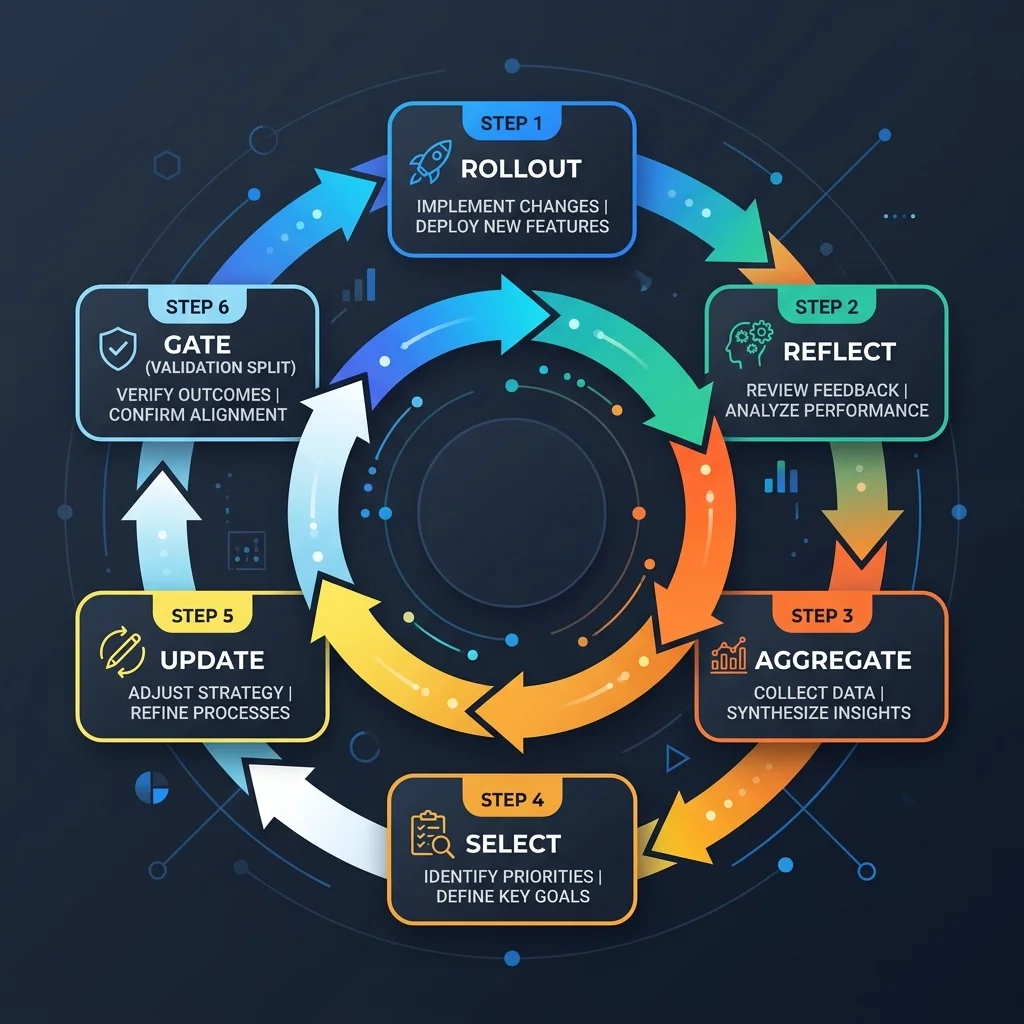
SkillOpt's core algorithm is called the ReflectTrainer loop. Each training step runs through six phases:
  1. Rollout     — Target model executes tasks using the current skill
  2. Reflect     — Optimizer analyzes errors, generates structured edit patches
  3. Aggregate   — Similar patches are merged to remove redundancy
  4. Select      — Edits are ranked and clipped to the current learning rate budget
  5. Update      — Selected edits are applied to the skill document
  6. Gate        — Candidate skill is evaluated on held-out validation split;
                   accepted only if score strictly improves
This loop runs for a configurable number of epochs (typically 4), each with a batch of tasks. At epoch boundaries, SkillOpt also writes "longitudinal guidance" into a protected section of the skill document — this is the momentum mechanism that prevents the agent from forgetting useful behavior from earlier epochs.
When to Use SkillOpt vs. Prompt Engineering vs. Fine-Tuning
Use SkillOpt When
- You have a repetitive, well-scoped task with clear pass/fail criteria — document extraction, QA pipelines, structured data transformation, embodied navigation
- You can afford $1–$5 per training run (that's the reported cost for an average enterprise task)
- You want human-auditable improvements — the trained skill.md is readable Markdown, not opaque weights
- Your task needs procedural discipline: formatting, tool-use policy, self-verification. These are where SkillOpt shines on frontier models.
- You have validation data — a held-out split the optimizer can gate against
Use Prompt Engineering When
- You need a quick answer now, not tomorrow
- You don't have a test set
- The task is one-shot or open-ended (creative writing, brainstorming)
- You want to iterate manually with intuition
Use Fine-Tuning When
- You need the model to learn new knowledge or new capabilities that can't be expressed as instructions
- You're willing to spend $50–$500+ per training run
- You can manage GPU allocation, checkpointing, and weight storage
- The improvement needs to be latency-free at inference (no extra context tokens)
The Sweet Spot
SkillOpt fills the gap between prompt engineering and fine-tuning:
              Prompt Engineering        SkillOpt               Fine-Tuning
              ──────────────────────────────────────────────────────────
Cost          $0                       $1–$5                 $50–$500+
Time          Minutes                  30 min – 2 hours       4 hours – days
Interpretable Yes (plain text)          Yes (plain Markdown)    No (weights)
Task scope    Any                        Well-scoped, testable  Knowledge/capability
Engineering   None                      100 lines YAML + data   Datasets, GPU infra
Audit trail   None                      52 eval cells tracked  Weights is black box
Installing SkillOpt
You need Python ≥ 3.10 and access to at least one model backend.
# Option A: Install from PyPI
pip install skillopt

# Extras for specific backends/benchmarks
pip install skillopt[claude]      # Claude backend
pip install skillopt[alfworld]    # ALFWorld benchmark
pip install skillopt[webui]       # Monitoring dashboard

# Option B: Install from source
git clone https://github.com/microsoft/SkillOpt.git
cd SkillOpt
pip install -e .
# Verify installation
python -c "import skillopt; print('SkillOpt ready!')"
Expected output:
SkillOpt ready!
Configuration
SkillOpt uses structured YAML configs. The config blocks are:
model:
  target_model: gpt-4o          # The model you're optimizing a skill for
  optimizer_model: gpt-4o       # The model that analyzes errors and proposes edits

train:
  epochs: 4
  batch_size: 40
  split_dir: /path/to/data      # Your task's train/validation/test splits

gradient:
  edit_type: add, delete, replace  # Allowed edit operations

optimizer:
  learning_rate: 16             # Max edits per step (analogous to learning rate)

evaluation:
  metric: hard                  # hard, soft, or mixed validation gate
You can override any config key at the command line:
python scripts/train.py --config configs/searchqa/default.yaml \
  --cfg-options optimizer.learning_rate=16
Running a Training Job
Here's the full workflow for training a skill on SearchQA — the quick-start example from the SkillOpt docs:
Step 1: Prepare Data
# Materialize the SearchQA dataset splits (~6.5 GB download)
python scripts/prepare_data.py --dataset searchqa --output data/searchqa_split
This creates data/searchqa_split/{train, valid, test} directories with the task instances.
Failure point: The download is 6.5 GB. Ensure you have enough disk space and a stable connection. For your own data, prepare a similar structure: one JSONL file per split with {"input": "...", "expected_output": "..."} entries.
Step 2: Launch Training
python scripts/train.py \
  --config configs/searchqa/default.yaml \
  --split_dir /path/to/searchqa_split \
  --azure_openai_endpoint https://your-resource.openai.azure.com/ \
  --optimizer_model gpt-4o \
  --target_model gpt-4o
Or for Anthropic backend:
python scripts/train.py \
  --config configs/searchqa/default.yaml \
  --split_dir /path/to/searchqa_split \
  --optimizer_model claude-sonnet-4 \
  --target_model claude-sonnet-4
What you'll see during training:
Epoch 1/4 — Batch 1/10 — Score: 0.42 — Edits: 12 — Accepted: 7/12
Epoch 1/4 — Batch 2/10 — Score: 0.51 — Edits: 8 — Accepted: 5/8
...
Epoch 4/4 — Batch 10/10 — Score: 0.83 — Edits: 3 — Accepted: 3/3
Validation gate: 0.81 → 0.83 — ACCEPTED ✓
Best skill saved: ckpt/searchqa/best_skill.md
Failure point: If the validation score drops at any epoch boundary (Score < best), the candidate is rejected. This is by design — SkillOpt only keeps edits that strictly improve the held-out score. If you see no improvement for multiple epochs, try increasing batch_size or reducing optimizer.learning_rate.
Step 3: Evaluate the Trained Skill
python scripts/eval_only.py \
  --config configs/searchqa/default.yaml \
  --skill ckpt/searchqa/best_skill.md \
  --split valid_unseen
Expected output:
Using skill: ckpt/searchqa/best_skill.md (1,247 tokens)
Results:
  Accuracy: 0.83
  F1: 0.79
  Latency (mean): 2.1s per task
  Cost: $0.012 per task
You can compare this against the no-skill baseline by running eval_only.py without --skill.
Step 4: Deploy
Copy the best_skill.md to your agent's prompt directory and include it in the system prompt context. The skill document is typically 300–2,000 tokens (median: 920 tokens). No additional models or infra needed at inference time.
What a Trained Skill Looks Like
Trained skill documents have a recognizable structure. Here's an excerpt from a SearchQA-optimized skill:
# Skill: SearchQA Agent

You are a search-based QA agent. Follow these rules strictly.

## Core Procedure
1. Parse the question to identify entities and query terms.
2. Formulate a search query using the 2–3 most specific terms only.
3. Read the search result snippet completely before answering.
4. If the snippet contains a direct answer, cite it with the source URL.
5. If the snippet is ambiguous, note the uncertainty and provide alternatives.

## Tool Use Policy
- Use the search tool for every question. Do not rely on parametric knowledge.
- Maximum 2 search calls per question. Do not loop on failed searches.
- Format search queries as plain strings — no special syntax.

## Self-Verification
- After writing your answer, verify it answers the original question.
- If your answer references a number, confirm it matches the source.
- If the question asks for a list, enumerate all items found — do not truncate.

## Common Errors (learned during training)
- ✗ Leading with "Based on the search results..." — just answer directly.
- ✗ Using the model's internal knowledge instead of search results.
- ✓ Citing the source URL in every answer.
- ✓ Reformatting dates to match the question's format.
Notice the "Common Errors" section — this is where SkillOpt's trajectory analysis crystallizes patterns the optimizer discovered during training. This section is generated by the optimizer model reflecting on failed rollouts.
Transferability: Skills Move Between Models and Environments

One of SkillOpt's most surprising findings: trained skills transfer across model scales and execution environments.
- Moving a skill optimized on GPT-5.5 to GPT-5.4-mini/nano still gives positive gains
- Moving a skill from the Codex agentic loop to Claude Code gives +59.7 additional points — the skill actually performs better in a different environment than where it was trained
- Transferring a skill from one math benchmark to a nearby math benchmark (no additional optimization) retains most of the gain
This means you can train a skill once on a frontier model and deploy it across your entire fleet of smaller/cheaper models. The cost savings are substantial.
How SkillOpt Compares to Other Optimization Approaches
| Method | Style | Average Improvement vs. No Skill | Cost per Run | Interpretable |
|---|---|---|---|---|
| Human-written skill | Manual | Baseline | Free (human time) | Yes |
| One-shot LLM skill | Generated | Similar to human | ~$0.01 | Yes |
| TextGrad | Gradient-based | Below SkillOpt | $10–$20 | Partial |
| GEPA | Evolution-based | Below SkillOpt | $5–$15 | No (evolved text) |
| Trace2Skill | Trace-based | Below SkillOpt | $1–$3 | Yes |
| EvoSkill | Evolution-based | Below SkillOpt | $3–$10 | Partial |
| SkillOpt | Structured opt. | Best or tied on 52/52 | $1–$5 | Yes |
Results from the SkillOpt paper (arXiv 2605.23904), evaluated across all 52 (model, benchmark, harness) combinations.
Open Questions and Limitations
SkillOpt is new (May 2026) and the research is honest about what it doesn't solve yet:
-
Overfitting risk. The validation gate helps, but if your validation split is too small or too similar to the training split, the skill may overfit. The authors recommend a minimum of 200 held-out examples.
-
Task scope. SkillOpt works best on well-scoped tasks with clear pass/fail criteria. It's not designed for open-ended creative tasks where "better" is subjective.
-
Optimizer model dependency. The quality of edits depends on the optimizer model's ability to analyze trajectories and write useful structural edits. A weak optimizer produces weak edits.
-
Cold start. Training starts from an empty or minimal skill document. If your task is complex, starting from a well-crafted human skill (rather than from scratch) converges faster and to a better final score.
-
Edit budget tuning. The learning rate (max edits per step) needs tuning. Too high → chaotic changes break the skill. Too low → the optimizer can't make progress. The paper's default of 16 edits per step is a starting point, not a rule.
What's Next
- Try it on your own task. The quickest path: pick a task you already have benchmark data for, install SkillOpt, and run the SearchQA example end-to-end. Then swap in your own data.
- Combine with DSPy. SkillOpt optimizes the external skill document; DSPy optimizes the program structure. They're complementary — use DSPy for the agent program, SkillOpt for the skill document.
- Read the paper. arXiv 2605.23904 has full ablation studies, transfer experiments, and comparison tables.
- Browse the code. github.com/microsoft/SkillOpt — MIT licensed, includes configs for all 6 benchmarks tested in the paper.
- Run the web UI dashboard.
pip install skillopt[webui]launches a monitoring dashboard for training runs:skillopt-dashboard.
Related Articles & Guides
 #agent-skills
Building Executable Multi-File Agent Skills (Scripts, Assets & Tools)
Move beyond text-only prompts: build advanced Agent Skills bundling deterministic Python/Bash scripts, asset templates, and reference schemas for AI coding agents.
 #agent-skills
Agent Skills — Open Standard for AI Agent Capabilities
Agent Skills are a lightweight, open format (SKILL.md) for extending AI agents with specialized knowledge and repeatable workflows. Supported by Claude Code, Gemini CLI, Antigravity CLI, OpenCode, Cursor, Copilot, and more.
Skill Packs
Free Agent Skills collections for AI coding agents. Copy-paste SKILL.md files for prompt engineering, Cursor IDE, and more.