Background Modification Prompts: Nano Banana Guide
Swap messy backgrounds for professional settings with Nano Banana. Master context control and subject isolation.
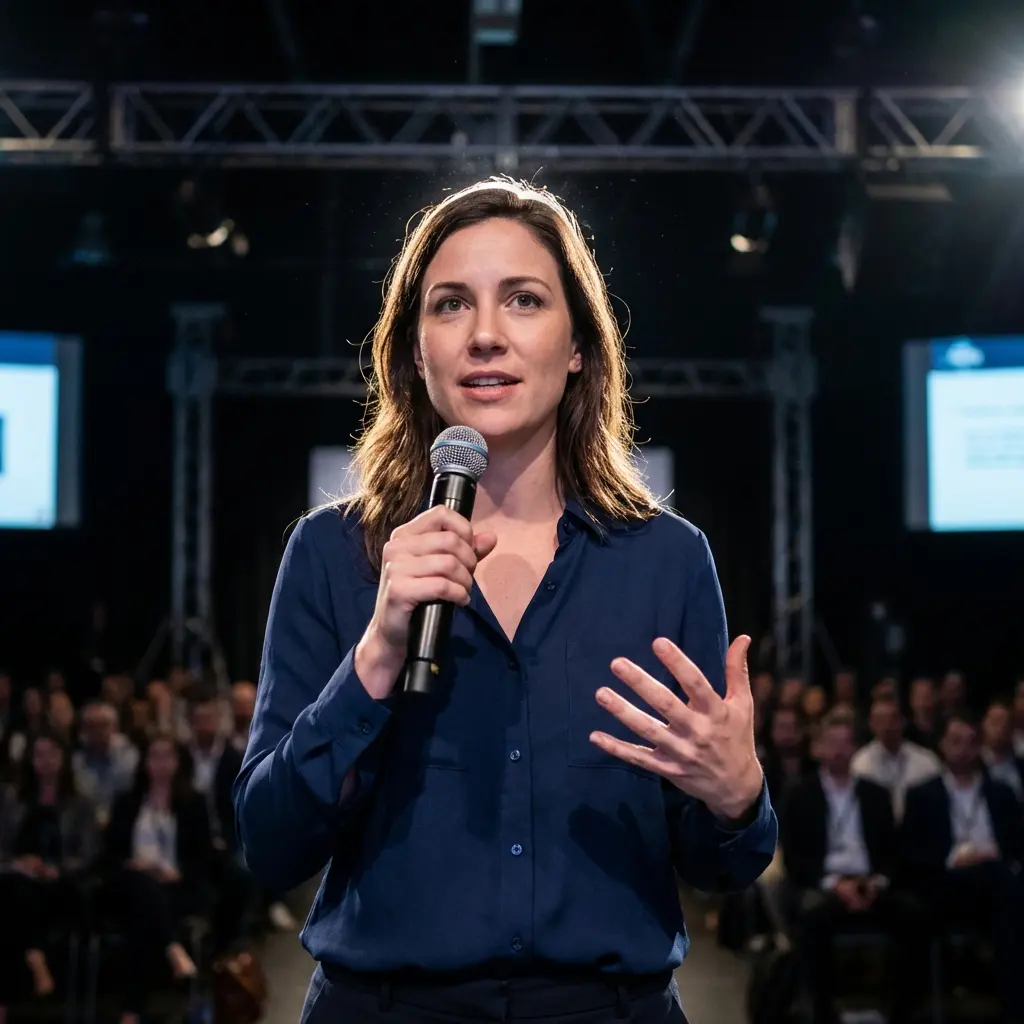
A great expression can be ruined by a messy room, a distracting crowd, or bad lighting. Nano Banana allows you to keep the subject exactly as they are (or slightly enhanced) while completely replacing the environment, giving you total control over the context of your image.
The Starting Point
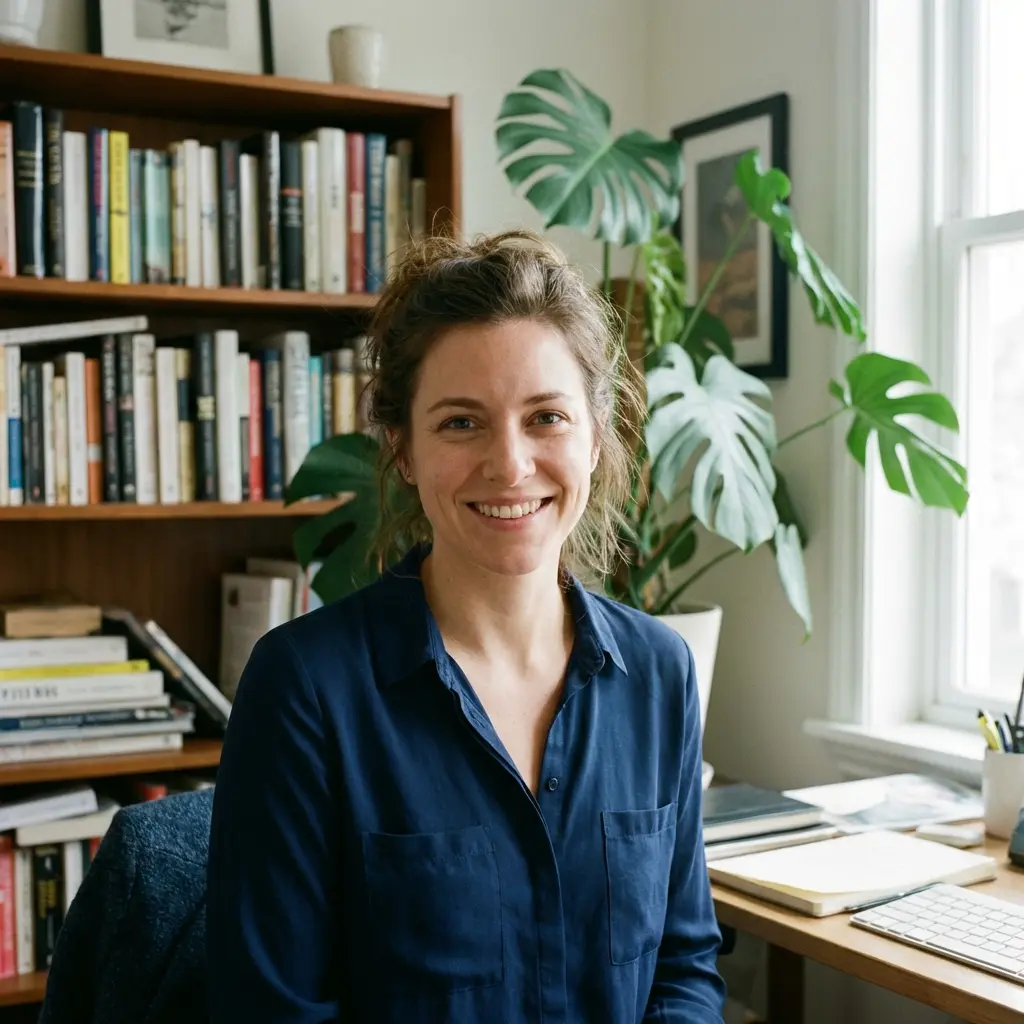
All transformations in this guide use the following image as the "Source Image." Notice the casual home office background—a bookshelf, a plant, and natural window light. Our goal is to replace this environment while keeping the subject consistent.
Understanding Background Control
The secret to a believable background swap isn't just the new image; it's the integration. The lighting on the subject must match the lighting of the new background. If you put a person lit by a blue computer screen into a warm sunset beach, it will look fake. Nano Banana handles this lighting adaptation automatically if prompted correctly.
Office Upgrade

[Source Image] Replace the messy home background with a professional office. Preserve: - Subject's face, hair, and clothing - Camera angle and perspective Transform Background: - **Setting**: Modern open-plan corporate office - **Details**: Glass walls, blurred workstations, architectural lighting - **Depth**: Shallow depth of field (bokeh) to focus on subject - **Lighting**: Cool, clean office daylight (5000K) Integration: - **Relight Subject**: Subtly adjust subject lighting to match the new cool office environment - **Shadows**: Cast natural shadows from the subject onto the environment - **Edges**: Clean, natural hair masking
Why This Works
The "Shallow Depth of Field": Asking for "bokeh" or "shallow depth of field" is the single best way to hide the fact that a background is fake. By blurring the background, you remove sharp details that might clash with the subject's resolution or perspective.
The "Glass Walls": Glass walls and architectural elements imply a high-end, spacious environment without needing specific furniture that might look cluttered.
The Lighting Match: Explicitly asking to "relight subject" ensures that the color temperature (cool office light vs. warm home light) is corrected, making the subject look like they are actually there.
Common Mistakes
Note:
Perspective Mismatch: If your selfie is taken from a high angle (looking down), don't ask for a background that is looking straight on. The floor and horizon lines won't match. Try to match the camera angle of the background to the subject.
Variations on Office Upgrade
Change the setting to suit different professional needs.
The Studio Backdrop
Create a clean, distraction-free look.

[Source Image] Change background to a professional studio backdrop. - **Type**: Hand-painted canvas texture - **Color**: Neutral beige or mottled grey - **Lighting**: Soft studio lighting - **Vibe**: High-end portrait photography - **Focus**: Sharp subject, soft background texture
What Changed: We removed the "office" entirely and replaced it with a "canvas texture," focusing purely on the subject.
The Outdoor Park
For a friendlier, more natural vibe.

[Source Image] Move subject to an outdoor park setting. - **Setting**: Lush green trees and sunlight filtering through leaves - **Lighting**: Golden hour (warm, backlighting) - **Effect**: Sun flare / lens flare - **Vibe**: Natural, approachable, eco-friendly
What Changed: We introduced "golden hour" lighting, which requires the AI to add warm rim lighting to the subject to make it believable.
Expanding Your Context
Place your subject in specific locations to tell a story.
The Coffee Shop Ambience
The "digital nomad" or creative professional look.

[Source Image] Place subject in a trendy coffee shop. - **Background**: Brick walls, warm hanging lights, blurred espresso machine - **Lighting**: Warm, cozy interior lighting - **Depth**: Subject in focus, busy shop blurred behind - **Vibe**: Creative, relaxed, modern
The Conference Stage
Position the subject as a thought leader.
[Source Image] Place subject on a conference stage. - **Background**: Dark auditorium with stage lights and blurred audience - **Lighting**: Strong spotlight on subject, rim light from back - **Vibe**: Keynote speaker, authority, leadership - **Context**: Holding a microphone (optional, if hands visible)
Troubleshooting
Next Steps
- LinkedIn Headshots: Create a full corporate professional portrait.
Related Articles & Guides
 #nano-banana
Nano Banana Workflows: Generation, Editing & Blending
Learn the three main workflows: pure generation, photo editing, and multi-image blending. Understand effort, complexity, and best use cases for each type.
 #nano-banana
Professional Content with Nano Banana: Business Photography
Create professional headshots, corporate photos, and business content with Nano Banana. Transform casual photos into polished professional images.
 #nano-banana
LinkedIn Headshot Prompts: Nano Banana Guide
Create professional LinkedIn headshots from selfies using Nano Banana prompts. Master lighting, attire, and background control.