Prompt Engineering in Cursor
Master prompt engineering in Cursor IDE. Agent mode vs inline editing, composer prompts, codebase-aware prompting, and .cursorrules integration strategies.
Prompt Engineering in Cursor
Cursor combines IDE integration with AI coding in three modes: Tab (completions), Inline Edit (Ctrl/Cmd+K), and Agent (Ctrl/Cmd+I). Each mode has different prompt engineering strategies.
Cursor's Three Prompt Interfaces
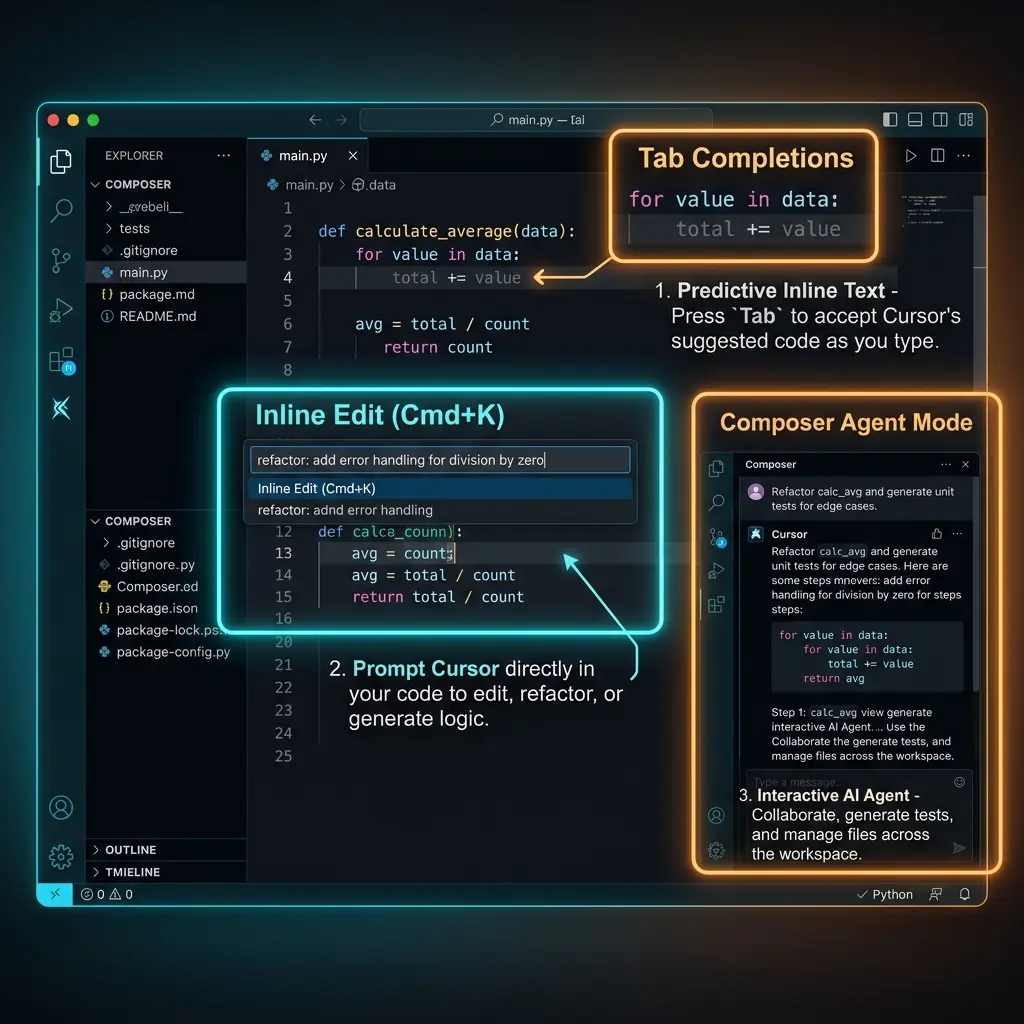
1. Tab Completions
Context-aware code suggestions as you type. You don't prompt these directly — Cursor infers from open files and recent edits.
Optimization: Keep related files open. Cursor reads your open tabs for context. If you're working on an auth form, keep the auth middleware and user model open.
2. Inline Edit (Ctrl/Cmd+K)
Edits a selection or generates code at cursor position:
// Select this comment and press Ctrl+K:
// Create a zod schema for user registration with email validation,
// password requirements (8+ chars, 1 uppercase, 1 number),
// and a confirm password field that must match
Strategy: Be specific about edge cases. Inline editing shows you a diff before applying — review the generated code carefully.
3. Agent Mode (Ctrl/Cmd+I)
Full agentic coding with access to your codebase, terminal, and file system. This is where prompts matter most.
Agent Mode Prompt Patterns
Pattern 1: The Scoped Task
> In src/components/UserTable.tsx, the sort function on column
  headers uses string comparison for dates. Fix it to use Date
  comparison. Only change the sortClickHandler function (line 142-178).
  Add a comment explaining the fix.
Pattern 2: The Multi-File Feature
> Add a "dark mode" toggle to the settings page:
  1. Check if next-themes is already installed (check package.json)
  2. If not, install it
  3. Create a ThemeToggle component in src/components/ui/
  4. Add it to the navbar in src/components/layout/Navbar.tsx
  5. Run npm run typecheck to verify no type errors
Pattern 3: The Investigation
> I'm seeing "Cannot read property 'map' of undefined" in production.
  The error occurs on the Dashboard page.

  1. Read src/app/dashboard/page.tsx
  2. Trace every `.map()` call and find the one that could receive undefined
  3. Add null checks or default values
  4. Add an error boundary around the component
  5. Run npm run build to verify
Composer Prompts (Ctrl/Cmd+Shift+I)
The Composer is a multi-file editor. Best for cross-cutting changes:
> Refactor the import paths in src/components/:
  - Change all `../../../lib/` imports to `@/lib/`
  - Change all `../../../types/` imports to `@/types/`
  - Don't change imports in src/pages/ or src/app/
  - After changes, run npm run typecheck
.cursorrules Integration
Cursor reads .cursorrules (or .cursor/rules/) for system instructions. This is similar to CLAUDE.md/AGENTS.md/GEMINI.md:
# .cursorrules

## Project Commands
- `npm run dev` — Start Vite dev server (port 5173)
- `npm run build` — TypeScript check + Vite build
- `npx vitest run` — Run all tests

## Coding Conventions
- Use TypeScript — no `any`, no implicit returns
- React components use named exports
- Tailwind CSS classes sorted by category (layout → spacing → color → typography)
- API calls use React Query hooks (never useEffect + fetch)

## When Using Agent Mode
- Always run type checks after code changes
- Never modify vite.config.ts without asking
- Create new files in the appropriate feature directory, not root
Cursor-specific rule format:
Cursor also supports a .cursor/rules/ directory with multiple rule files:
.cursor/rules/
├── typescript.md         # "alwaysApply: true"
├── react-patterns.md     # "alwaysApply: false, description: React patterns"
└── testing.md            # "alwaysApply: false, globs: **/*.test.*"
---
alwaysApply: true
---
# TypeScript Rules
- Strict mode enabled — no exceptions
- Prefer `interface` over `type` for object shapes
- Use `satisfies` for type validation with inference
See the Cursor Rules section for 50+ framework-specific .cursorrules templates.
Codebase-Aware Prompting
Cursor indexes your codebase. Reference patterns it can find:
> Create a new API endpoint at src/app/api/teams/route.ts that follows
  the same pattern as src/app/api/users/route.ts. Same auth middleware,
  same error response format, same pagination pattern.
Cursor will read users/route.ts, understand the pattern, and replicate it for teams/route.ts.
Pattern References
> I need a form component like the one in src/components/forms/SignupForm.tsx,
  but for team creation. Same validation library (zod), same UI library (shadcn),
  same submit handling pattern.
Common Pitfalls
Confusing Agent Mode with Chat
> Tell me about React hooks   ← Use ChatGPT/Claude for this, not Cursor Agent

> Refactor this component to use useCallback for the event handlers   ← Right tool
Scope Creep in Composer
> Clean up the codebase   ← Too vague. Cursor might touch hundreds of files

> Standardize import paths in src/components/ — replace relative imports
  with @/ path alias   ← Properly scoped
Not Reviewing Agent Changes
Agent mode can make many changes quickly. Always review the diff before accepting. Use version control:
# Before running Agent mode on a big task
git stash
# Run the task
# Review git diff
# Accept or git stash pop
Related Pages
- Cursor Configuration & Rules — .cursorrules setup, settings
- Cursor Rules Section — 50+ framework-specific .cursorrules templates
- Tool Comparison — Cursor vs Claude Code vs OpenCode vs Copilot
Related Articles & Guides
Cursor — AI-Powered IDE
Complete guide to Cursor, the AI-powered code editor. Covers prompt engineering, .cursorrules, agent mode, composer, and best practices for AI-assisted development.
Jev Prompt Engineering — Questions, Criteria & State
How to write Jev questions and criteria that hold up: one judgment per question, situation-based criteria, clean state, parallelism, and the model's known failures.
Pi — Terminal AI Coding Agent
Complete guide to pi, Mario Zechner's minimal terminal coding agent. Covers installation, prompt engineering, context files, skills, and the lean-harness philosophy.