Run Qwen-Image 2.1 in Google Colab with ComfyUI
A complete walkthrough: install ComfyUI and GGUF support on a Colab GPU runtime, download Qwen-Image 2.1 weights, import a working workflow, generate an image, and avoid the five errors we hit.
This walkthrough runs Qwen-Image 2.1 in ComfyUI on a Colab GPU runtime, end to end: install, model download, workflow import, and a first image. We hit five distinct errors writing this — each is documented in the troubleshooting table at the bottom, and each cost us time precisely because they look like other failures.
The verified setup uses a Qwen-Image 2.1 GGUF build with a flat (non-subgraph) workflow. A Q4_K_M quant keeps the stack around 15 GB, which runs comfortably on an L4-class GPU.
One note before you start: the base model carries the Qwen Research License, and the community GGUF packaging used here ships without a safety checker — it will generate adult and sensitive imagery without refusal. Treat the model accordingly.
1. Choose a runtime
Connect on a GPU runtime — an L4 works well. A T4 (16 GB VRAM) can run the Q4 quant with --lowvram but is slower; A100-class machines are more than this model needs. Rough burn rates we have observed: T4 around 1.2–1.5 compute units/hour, L4 around 1.8–2.5, A100 around 5.4–7.5 — treat these as observations, not published rates.
2. Install ComfyUI and GGUF support
%cd /content
!git clone https://github.com/Comfy-Org/ComfyUI.git

%cd /content/ComfyUI
!pip install -r requirements.txt

!git clone https://github.com/leejet/ComfyUI-GGUF.git \
  /content/ComfyUI/custom_nodes/ComfyUI-GGUF

# REQUIRED: the GGUF node's own dependencies (gguf, sentencepiece, protobuf)
!pip install -q -r /content/ComfyUI/custom_nodes/ComfyUI-GGUF/requirements.txt
The last two lines are the trip-wire of this whole setup. If the GGUF node's requirements are missing, ComfyUI silently skips the extension — no error, just a missing Unet Loader (GGUF) node and a confusing "missing required model file" later. Verify the nodes landed before proceeding:
import urllib.request, json
d = json.load(urllib.request.urlopen("http://127.0.0.1:8188/object_info"))
print("GGUF nodes:", [k for k in d if "GGUF" in k])
Run that after starting the server in step 5. It should list UnetLoaderGGUF among the node types.
3. Download the model files
Three files, three directories:
!wget -c "https://huggingface.co/abenzerps/Qwen-Image-2.1-Uncensored-GGUF/resolve/main/qwen-image-2.1-UC-Q4_K_M.gguf" \
  -O /content/ComfyUI/models/diffusion_models/qwen-image-2.1-UC-Q4_K_M.gguf

!wget -c "https://huggingface.co/abenzerps/Qwen-Image-2.1-Uncensored-GGUF/resolve/main/text_encoders/qwen3vl_8b_int8_convrot.safetensors" \
  -O /content/ComfyUI/models/text_encoders/qwen3vl_8b_int8_convrot.safetensors

!wget -c "https://huggingface.co/abenzerps/Qwen-Image-2.1-Uncensored-GGUF/resolve/main/vae/qwen_image_2.1_vae_bf16.safetensors" \
  -O /content/ComfyUI/models/vae/qwen_image_2.1_vae_bf16.safetensors
The stack is roughly 15 GB — a few minutes of download. The Hugging Face models guide covers verification and persistence if you want outputs and weights to survive the runtime.
4. Get the workflow file
You have two options for the workflow file:
-
Use our tested flat workflow. Download it from this site — it is the exact file from our run:
!wget -c "https://promptgenius.net/tools/colab/qwen_uc_workflow.json" \ -O /content/qwen_uc_workflow.json -
Use the official template with a loader swap. The Comfy-Org template
image_qwen_image_2_1_t2i.jsonloads its diffusion model with a standardUNETLoadernode pointing at files you have not downloaded. Replace that node withUnet Loader (GGUF)and selectqwen-image-2.1-UC-Q4_K_M.gguf— the model card documents this path. Beware one trap we hit: an older frontend silently fell back to ComfyUI's built-in Z-Image template on import, which fails with "z_image_turbo_bf16.safetensors is missing." That error means you are looking at the wrong workflow, not a broken install — start from File → New and import again.
5. Start the server
%cd /content/ComfyUI
import subprocess, time

comfy = subprocess.Popen(
    ["python", "main.py", "--listen", "0.0.0.0", "--port", "8188",
     "--lowvram", "--enable-cors-header", "*"],
    stdout=open("/content/comfyui.log", "w"), stderr=subprocess.STDOUT)
time.sleep(12)
Both flags matter:
--enable-cors-header '*'— without it, ComfyUI refuses to serve its own JavaScript through a tunnel or iframe and you get a blank page stuck on "Loading ComfyUI".--lowvram— helps on 16 GB cards. Skip it on 24 GB+; it only slows larger GPUs down.
Confirm the server is up before touching a browser:
import urllib.request, json
d = json.load(urllib.request.urlopen("http://127.0.0.1:8188/object_info"))
print("nodes:", len(d))
print("GGUF:", [k for k in d if "GGUF" in k])
Then reach the UI — Colab's built-in proxy is the fastest path:
from google.colab.output import eval_js
print(eval_js("google.colab.kernel.proxyPort(8188)"))
A Cloudflare quick tunnel also works, but its first page load can take minutes. That is the tunnel, not your install.
6. Import the workflow and generate
- Open the proxy URL and choose File → New first. ComfyUI autosaves the last workflow — if a broken one was ever open, every reload reopens it. Clear it deliberately.
- Drag
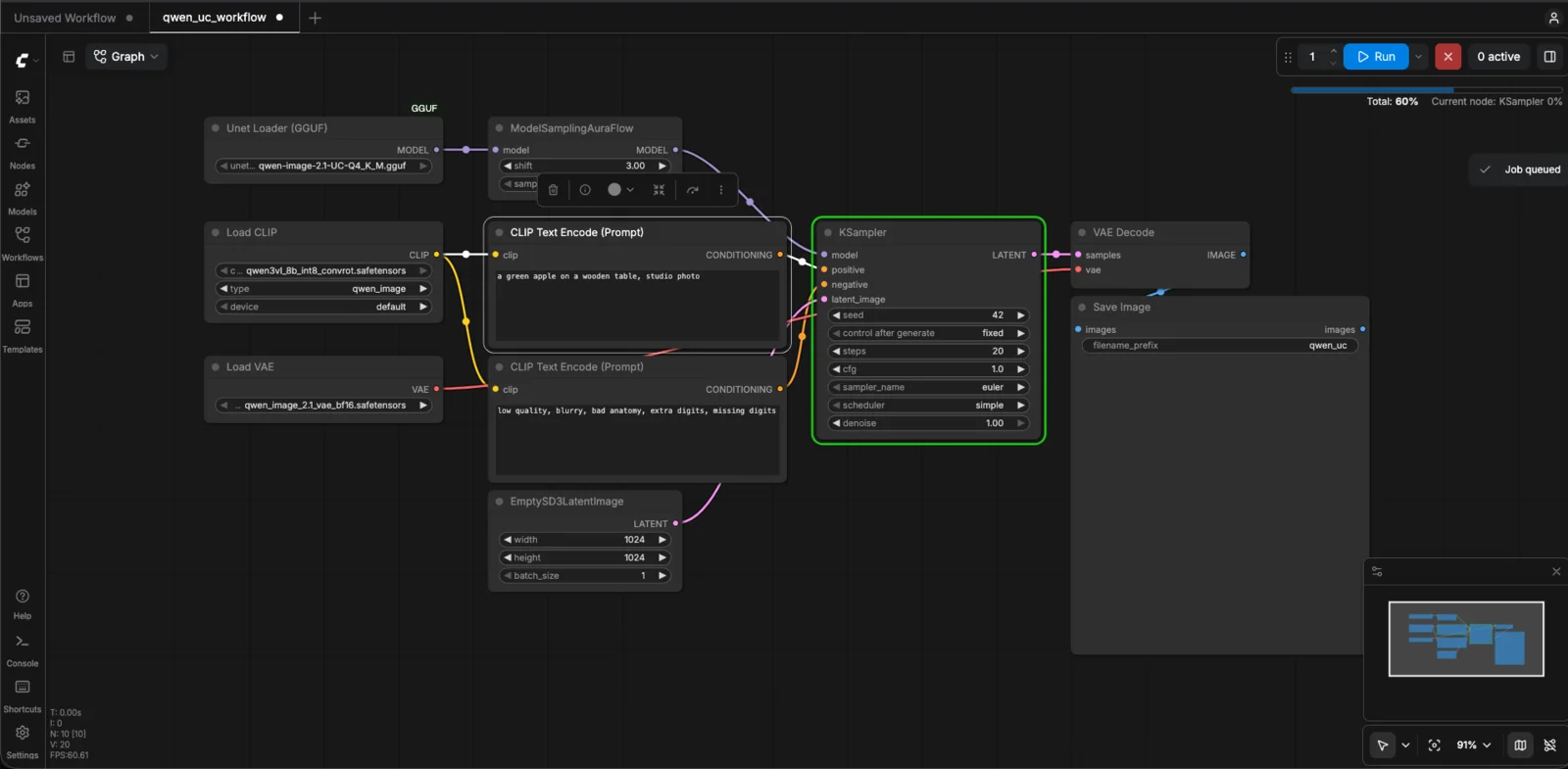
qwen_uc_workflow.jsonfrom the file sidebar onto the canvas. - Check the three loader nodes: Unet Loader (GGUF) →
qwen-image-2.1-UC-Q4_K_M.gguf, Load CLIP →qwen3vl_8b_int8_convrot.safetensorswith typeqwen_image, Load VAE →qwen_image_2.1_vae_bf16.safetensors. - Run. Defaults of 1024×1024, 20 steps, CFG 1 generate the sample prompt's image — fast on an L4, though we did not benchmark it precisely.
The sample prompt's output — "a green apple on a wooden table, studio photo":

Outputs land in /content/ComfyUI/output/ — save anything you want to keep to Drive before the runtime dies.
Troubleshooting table
Every error we hit, in the order they appear:
| Symptom | Actual cause | Fix |
|---|---|---|
Unet Loader (GGUF) never appears in the node list | GGUF node's requirements.txt never installed | Run the pip install -r .../ComfyUI-GGUF/requirements.txt line |
| "z_image_turbo_bf16.safetensors is missing" | The official subgraph template silently loaded the built-in Z-Image workflow | File → New, then import qwen_uc_workflow.json |
| Blank UI stuck on "Loading ComfyUI", 403s in the log | CORS: the server refuses its own JS without the flag | Restart with --enable-cors-header '*' |
| Local server fine, public page takes minutes to first load | In our run, the trycloudflare.com quick tunnel stalled on the first asset burst | Wait it out, or use Colab's proxyPort instead |
| "Restarted" the server but the node is still missing | Plain pkill missed the live process; old server still bound to 8188 | pkill -9 -f "main.py", confirm with `ps aux |
The server log at /content/comfyui.log tells you which case you are in: a skipped custom node shows as Cannot import ... No module named 'gguf', and a successful load shows the GGUF extension importing cleanly.
Next
- Run MiniMax H3 in Colab with ComfyUI — the same machinery, at roughly two and a half times the download size, producing video.
- Working in Colab — the underlying skills: Drive persistence, GPU inspection, and access paths.
Related Articles & Guides
 #google-colab
Test Image and Video Models on Colab GPUs: One VM, Mix and Match
Run keyframe and image-to-video models on one Colab VM, swap models and GPUs through one storyboard, and measure time, VRAM and quality to find the best fit.
Using Hugging Face Models in Google Colab
Download open-weight Hugging Face models into Colab correctly: list repo files before downloading, budget disk and VRAM, verify weights, and put files in the layout tools like ComfyUI expect.
 #anime
Make a Narrated Anime Short with AI: Keyframes, Chained Video, Foley, Score & Voice
Build a 45-second narrated anime short on one Colab A100: Anima keyframes, Wan 2.1 first/last-frame clips, Stable Audio Open foley, ACE-Step score, Kokoro narration, one FFmpeg mix.