Build a Pose + Costume + Character Reference Pipeline
Build a three-reference image pipeline: a character portrait, a pose mannequin, a ghost-mannequin outfit, a role contract, and a short Node script for OpenAI-compatible image edits.
Quick Answer
What you'll build: a repeatable three-reference pipeline — one character portrait, one pose mannequin, one ghost-mannequin outfit — plus the role contract that tells the model what each reference owns, a short dependency-free Node script that calls an OpenAI-compatible /v1/images/edits endpoint, and a scorecard for checking the result.
What it costs: the composite in this blueprint was generated in the Gemini app. The script is built for a paid image-edit endpoint; on most providers you pay per output image. Check current pricing before you run a batch.
The catch: the model does the compositing. The pipeline only sets the constraints. If the references disagree, the model averages them.
Most "AI character" workflows are one prompt and a prayer. The model gets a paragraph and a reference or two, and the reader is told to iterate. That works until you need the same person in a specific pose wearing a specific outfit, repeatedly. Then the failures are structural: the pose reference's mannequin body overrides the character's proportions, the costume reference's model face bleeds into the character, or the model turns three references into a character sheet because that is what its training data did with multiple views.
This blueprint builds the constraints first. It is not a new model, and it is not a ControlNet pipeline. It is the layer above the model: three references with one job each, a prompt contract that resolves conflicts, a small script that sends the request, and a test that tells you which part failed.
The four layers
| Layer | What it decides | What breaks without it |
|---|---|---|
| Catalog | Which references exist, what they contain, and what you may legally use | You prompt against whatever image is on your desktop |
| Role assignment | Which reference owns which attribute | The costume model's face, or the mannequin's body, leaks into the character |
| Prompt contract | How conflicts are resolved and what the output may not contain | The model averages the references into a collage or a sheet |
| Model call | The actual edit request | Nothing; this is the easy part |
The model is the least interesting layer. The other three decide whether the output is usable.
The three references
This is the reference set used for the composite.
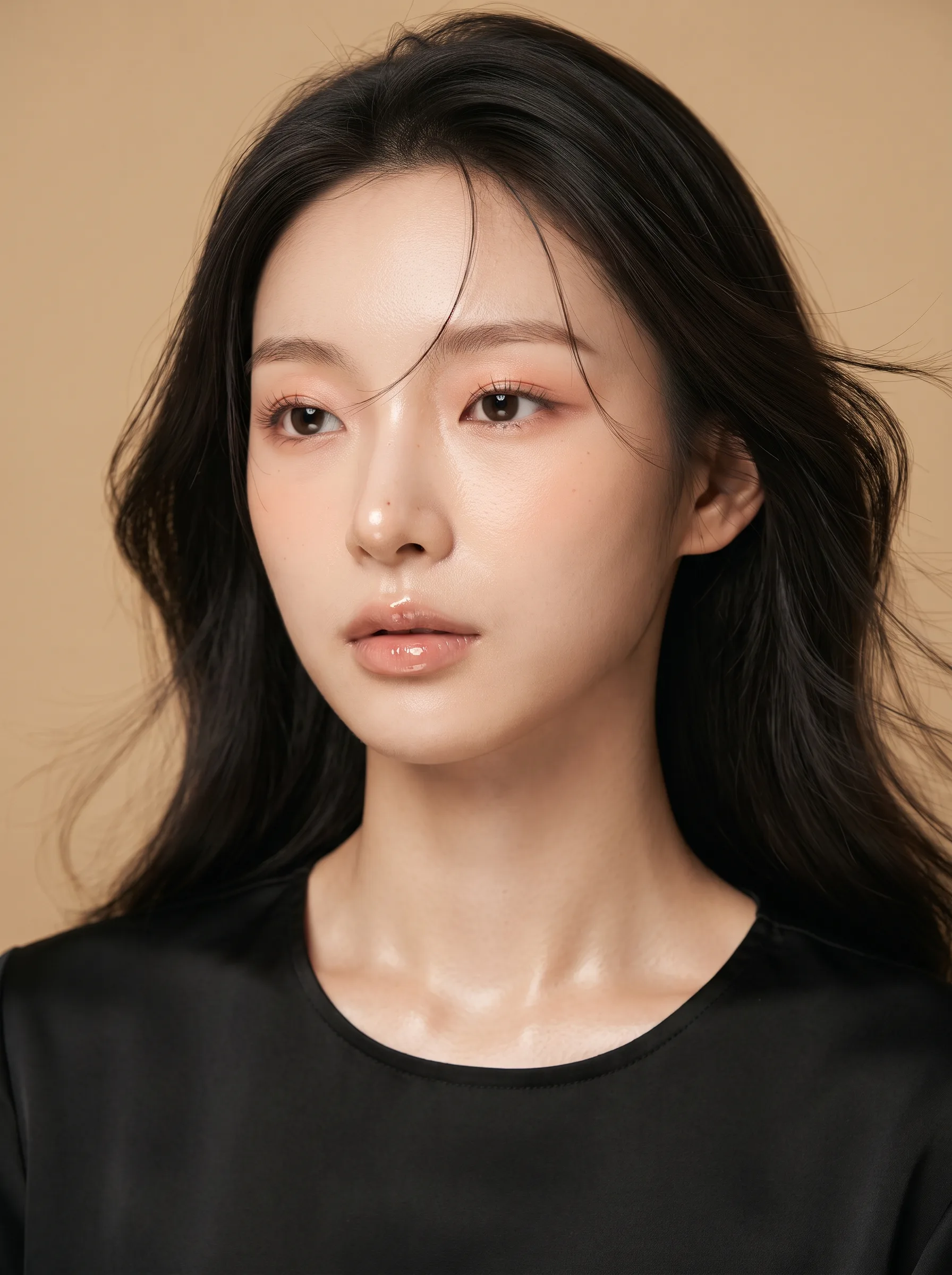
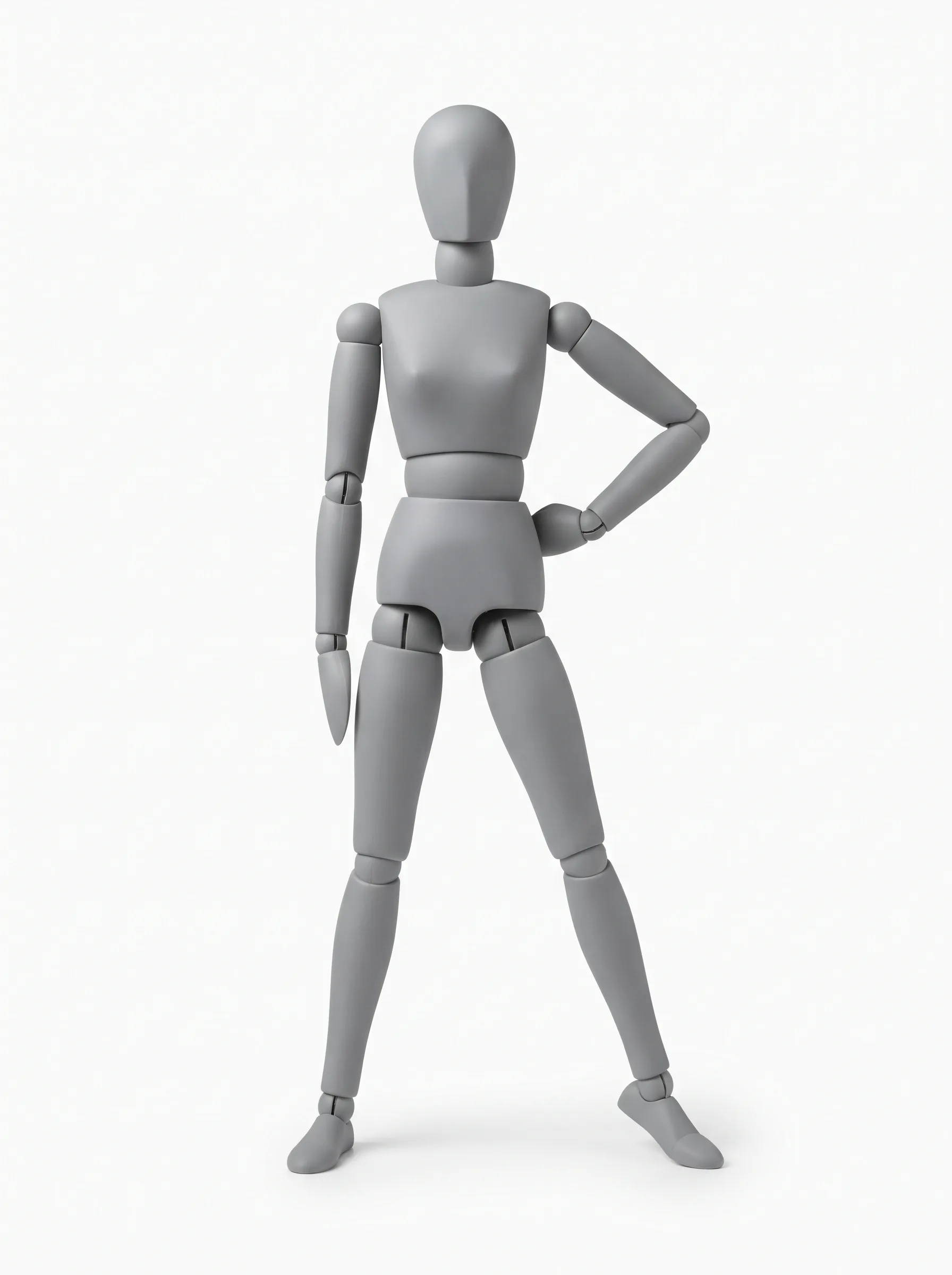
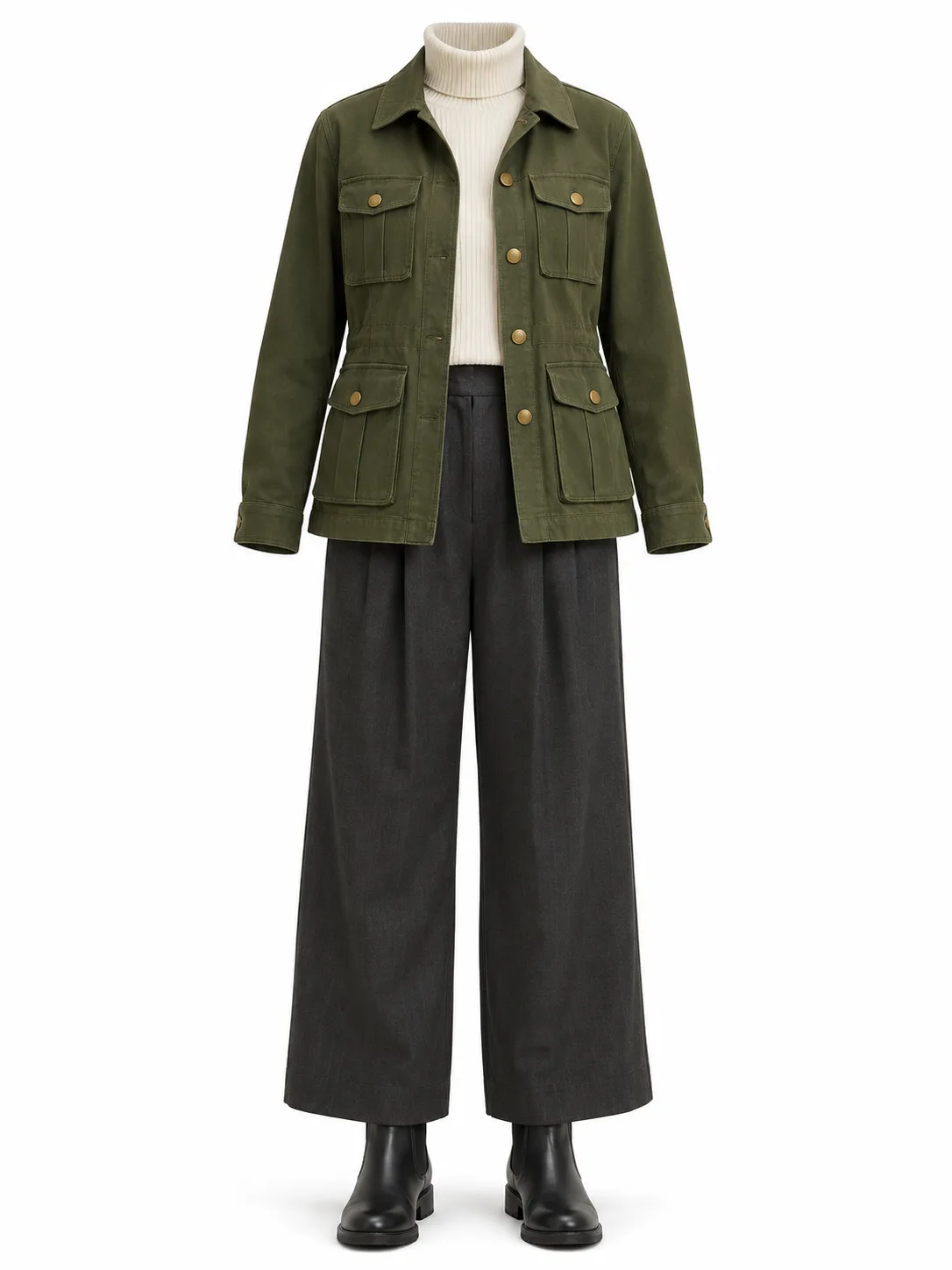
The person is fictional and the references were generated for this blueprint. No real person's likeness is used.
Character reference
Use a face-forward portrait with a calm expression, even light, and no strong pose. The example is a close-up beauty portrait on purpose: it removes the body from the identity reference and keeps the top and the backdrop too plain to compete. The model only has one thing to take from it.
What to avoid:
- A full-body photo in a strong pose. The model will copy the pose as well as the face.
- A fashion shot with a distinctive outfit. The jacket will fight the costume reference.
- A heavy beauty filter or a stylised illustration if the output should be photographic.
- A group photo or a frame with other people.
Pose reference
Use one figure, full body, head to feet, on a plain background. A grey artist's mannequin with joint lines is better than a photo of a person because it carries mechanics without identity. There is no face to copy, no hair to bleed, and no garment to fight the costume reference.
What to avoid:
- A pose sheet with six or twelve panels. The model will reproduce the sheet layout instead of selecting one pose.
- A cropped figure. If the feet are missing, the model invents them.
- A photo with a strong facial expression or a distinctive outfit. Both become extra references.
- A pose that hides the hands or the weight-bearing leg. The model needs the contact points.
The mannequin still carries a body shape. That is a bug you will see later: the pose reference can override the character's proportions. The prompt has to say which one owns the body.
Costume reference
Use a ghost-mannequin product shot: the complete outfit, front view, collar to boots, plain background, no person, no hanger, no hands, no skin. The example includes the shoes because a missing shoe is an invitation for the model to invent one.
What to avoid:
- A flat-lay. The garment loses its volume and the model guesses the fit.
- A model wearing the outfit. The model's face, hair, and stance become competing references.
- A partial outfit. If the reference stops at the waist, the trousers come from the model's imagination.
- A busy set or a styled scene. The background and props leak into the output.
Making the references
The pose is a front-facing mannequin. The reference should be striking enough to carry the face, but plain enough that it does not fight the pose or the costume.
Character reference
3:4 vertical, photorealistic high-end beauty editorial portrait, ultra-high-
definition. An original fictional adult East Asian woman, age 24, delicate small
oval face, naturally balanced features, large almond eyes with soft double
eyelids and elongated outer corners, dark brown eyes, a slim natural nose with a
small defined tip, full soft lips with a natural cupid's bow and high-shine nude
rose-pink gloss. Calm, slightly languid gaze past the lens, lips relaxed, no wide
smile. Long dark brown-black hair with natural volume, softly blown back, a few
loose strands framing the face; hair does not cover the eyes. Fair, fine-textured
skin with visible pores, natural peach undertone, dewy sheen on the cheekbones,
nose tip and collarbones, no over-smoothing. Refined low-saturation nude makeup:
soft peach-pink eyeshadow, fine brown eyeliner, long natural lashes, subtle
aegyo-sal, light peach flush. She wears a simple black silk crew-neck top. Warm
sand-colored seamless studio backdrop, soft late-afternoon key light from above
and slightly to the side, broad soft fill, gentle rim light, realistic specular
highlights, natural catchlights. 85mm portrait lens, f/2.0, shallow depth of
field, head-and-shoulders to mid-chest, face about 60% of the frame, camera at
eye level. High-end beauty campaign, natural skin microtexture, realistic
anatomy, warm natural color grading, real photography, no CGI look. No text, no
watermark, no logo, no other people.
Pose reference
3:4 vertical single full-body pose reference on a seamless white background. One
adult woman as a clean matte-grey artist's mannequin with subtle joint lines and
simple blocky forms. Front view: the mannequin faces the camera directly, chest
and blank face visible, not a back view. Confident editorial stance: feet planted
wide apart in an A-stance, both soles on the floor, weight centred, the
mannequin's own left hand on the hip, its right arm relaxed at the side, chin up,
looking straight ahead. Left and right are the mannequin's own, not the
viewer's. Full body from head to feet, no cropping, centered, generous margin.
Neutral studio lighting, soft contact shadow only, no facial features beyond a
simple mannequin head, no hair, no clothing details, no text, no labels, no extra
figures, no panels.
Costume reference
Generate a 3:4 vertical ghost-mannequin product reference of one complete
outfit on a seamless white background. Outfit: a structured olive-green utility
jacket with brass buttons and four patch pockets, a cream ribbed turtleneck,
charcoal wide-leg trousers, and black leather Chelsea boots. The outfit is worn
by an invisible mannequin, front view, full look from collar to boots, centered
with a generous margin. Even soft studio lighting, subtle contact shadow, no
person, no face, no hands, no skin, no hanger, no text, no logo, no watermark.
Generate the character first. The face is the hardest reference to replace, and every later test depends on it staying recognisable.
Rights
A reference set is a licensed asset, not a folder of images. Use references you generated, commissioned, or licensed for this use. Do not scrape a gallery and ship the images with your product. The licensing section covers the terms that matter.
One authority per attribute
The core rule is simple: every attribute has exactly one authority. The other references are forbidden from contributing to it.
| Attribute | Authority | Forbidden from |
|---|---|---|
| Face, facial features, face shape | Character | Pose and costume references |
| Hair, hair colour, skin tone | Character | Pose and costume references |
| Body proportions and silhouette | Character | Pose reference's mannequin body |
| Action, balance, weight distribution | Pose | Character and costume references |
| Viewpoint, framing, occlusion | Pose | Character and costume references |
| Garment design, colour, material, fit | Costume | Character and pose references |
| Footwear and accessories | Costume | Character and pose references |
| Background, lighting, output layout | Prompt | All references |
The priority order is identity > pose > costume. When two instructions conflict, the model needs to know which one wins.
- If the pose angle would distort the face, move the camera — not the face.
- If the costume would restrict the pose, let the garment drape and crease — do not change the pose to fit the jacket.
- If the character's proportions conflict with the mannequin's, keep the character's proportions and use the mannequin only for action.
This is not a style preference. The model has no layer graph. Every reference is evidence, and the prompt is the only conflict resolver. Without an explicit priority, the model tends to follow the most visually dominant reference, which is usually the pose or the costume, not the face.
The prompt contract
The template below is the contract behind the composite; the Gemini run used the same wording with each reference named by content instead of by number. It has four parts: role statements, priority, output guard, and negative list.
Create one finished full-body character photograph using the three attached
references.

Image 1 — character reference. Preserve her identity only: face, facial
features, face shape, long dark brown-black hair, fair skin, glossy nude-rose
lips, and editorial beauty style. Do not copy its crop or background.

Image 2 — pose reference. Use only the pose, balance, viewpoint, framing, and
occlusion: front-facing wide A-stance, feet planted apart, weight centred, her
own left hand on her hip, her right arm relaxed at her side, chin up, gaze
ahead. Left and right are hers, not the viewer's. Do not
copy the mannequin's grey surface, joint lines, body shape, or blank face.

Image 3 — costume reference. Dress the same woman in the olive-green utility
jacket with brass buttons and four patch pockets, cream ribbed turtleneck,
charcoal wide-leg trousers, and black leather Chelsea boots. Preserve the
garments' design, colour, material, and fit. Do not copy the ghost-mannequin
arrangement or the outfit model's face or stance.

Priority: identity outranks pose; pose outranks costume. If the pose angle would
distort her face, change the camera angle, not the face. Let the jacket and
trousers drape and crease naturally with the pose. Keep her fully clothed.

Output: one continuous vertical 3:4 photograph, one person, one viewpoint, full
body from head to boots. Warm sand seamless studio background with a plain floor.
Soft editorial studio light. No panels, no character sheet, no collage, no inset
close-ups, no extra angles, no repeated people, no text, no logo, no watermark.
If your uploader reorders attachments, replace the image numbers with the reference content — "the portrait", "the grey mannequin", "the ghost-mannequin outfit" — as the Gemini run did. A number is only reliable when you control the order.
Why each part exists
Role statements stop the model from using the whole reference. "Preserve her identity only" is doing more work than "use this as a reference." The paired "Do not copy..." sentence closes the obvious loophole.
The priority clause resolves the conflicts the roles create. The model will still see the mannequin's body and the costume's stance. The sentence tells it which evidence to discard.
The output guard is the anti-collage clause. Three images in one request look like a character sheet to a model trained on multi-view turnarounds. "One continuous photograph, one person, one viewpoint" is not decoration; it is the instruction that prevents the default layout. The negative list reinforces it: no panels, no collage, no extra angles.
The negative list is finite. Do not try to list every failure. Name the ones that have actually happened: text, watermark, extra people, panels, inset close-ups.
Note:
Do not describe the character's clothing in the character-reference paragraph. If you say "she wears a black silk top" and the costume paragraph says "olive jacket," the model has two outfit instructions. Keep the character paragraph about the body and face. Let the costume paragraph own every garment.
The call
The script is deliberately boring. It does not know about poses, costumes, or characters. It reads a prompt, attaches three images, posts a multipart form, and saves the result. The intelligence is in the prompt and the references.
Save this as compose.mjs. It needs Node 18 or newer; there are no dependencies.
#!/usr/bin/env node
import { readFile, writeFile } from "node:fs/promises";
import { basename, extname } from "node:path";

const args = Object.fromEntries(
  process.argv.slice(2).reduce((acc, arg, i, all) => {
    if (arg.startsWith("--")) acc.push([arg.slice(2), all[i + 1]]);
    return acc;
  }, []),
);

for (const key of ["base-url", "model", "character", "pose", "costume", "prompt", "out"]) {
  if (!args[key]) {
    console.error(`Missing --${key}`);
    process.exit(1);
  }
}

const apiKey = process.env.IMAGE_API_KEY;
if (!apiKey) {
  console.error("Set IMAGE_API_KEY in the environment");
  process.exit(1);
}

const mime = (path) =>
  ({
    ".png": "image/png",
    ".jpg": "image/jpeg",
    ".jpeg": "image/jpeg",
    ".webp": "image/webp",
  })[extname(path).toLowerCase()] || "application/octet-stream";

async function filePart(path) {
  const bytes = await readFile(path);
  return new Blob([bytes], { type: mime(path) });
}

const [character, pose, costume, prompt] = await Promise.all([
  filePart(args.character),
  filePart(args.pose),
  filePart(args.costume),
  readFile(args.prompt, "utf8"),
]);

const form = new FormData();
form.set("model", args.model);
form.set("prompt", prompt);
form.set("n", "1");
form.set("size", args.size || "1024x1536");
if (args.quality) form.set("quality", args.quality);
form.append("image[]", character, basename(args.character));
form.append("image[]", pose, basename(args.pose));
form.append("image[]", costume, basename(args.costume));

const base = args["base-url"].replace(/\/+$/, "");
const response = await fetch(`${base}/images/edits`, {
  method: "POST",
  headers: { Authorization: `Bearer ${apiKey}` },
  body: form,
  signal: AbortSignal.timeout(180_000),
});

const text = await response.text();
if (!response.ok) {
  console.error(`HTTP ${response.status}\n${text.slice(0, 800)}`);
  process.exit(1);
}

const payload = JSON.parse(text);
const row = payload?.data?.[0];

if (row?.b64_json) {
  await writeFile(args.out, Buffer.from(row.b64_json, "base64"));
} else if (row?.url) {
  const image = await fetch(row.url, { signal: AbortSignal.timeout(60_000) });
  if (!image.ok) {
    console.error(`Image download failed: HTTP ${image.status}`);
    process.exit(1);
  }
  await writeFile(args.out, Buffer.from(await image.arrayBuffer()));
} else {
  console.error("No image in response");
  process.exit(1);
}

console.log(`Saved ${args.out}`);
Run it with the prompt in a file:
export IMAGE_API_KEY="..."
node compose.mjs \
  --base-url https://api.example.com/v1 \
  --model your-image-edit-model \
  --character character.png \
  --pose pose.png \
  --costume costume.png \
  --prompt prompt.txt \
  --out result.png
Four things to check before you run a batch:
- The endpoint supports multi-image edits. The script sends three
image[]parts. Some providers accept only one image per edit, some accept animagearray in JSON, and some require base64 instead of multipart. Read the provider's docs; the script is the OpenAI multipart shape, not a universal contract. - The model name is the image-edit model. A chat model will return text or reject the form. Test with one image and a one-line prompt first.
- The response shape is
data[0].b64_jsonordata[0].url. If the provider wraps the result differently, adapt the last block. Do not parse a success message as an image. - The size matches the prompt. The default
1024x1536is 2:3, the closest standard size on OpenAI-shape endpoints; the prompt asks for 3:4. Pass--sizewith a 3:4 size if the provider offers one, or crop afterwards.--qualityis only sent when you pass it, because some endpoints reject values they do not know.
The API key is read from the environment, not from a command-line argument, so it does not land in your shell history. The script never logs it. If the response fails, it prints the status and the first 800 characters of the body, which is usually enough to see whether the problem is the key, the model, or the image payload.
The no-code path
You do not need the script to test the contract. Upload the three references to a chat model that accepts multiple images, paste the prompt, and ask for one image.
The composite in this blueprint was generated in the Gemini app (Nano Banana) with one prompt and three attachments, each reference named by content as described above.
What the run produced
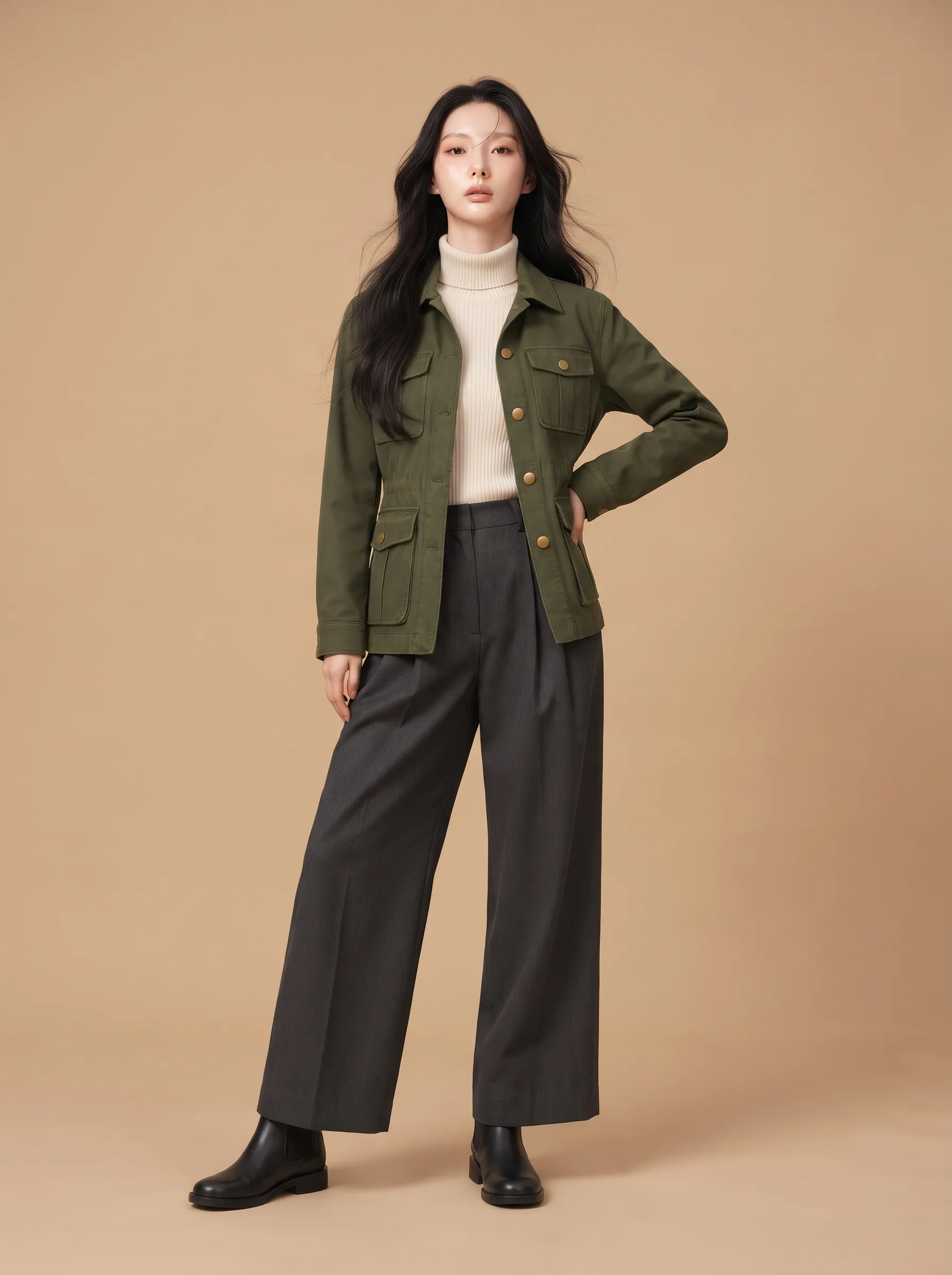
Identity. The face, long dark hair, fair skin, and glossy lips survive. The face is a little softer and more idealised than the reference, which is the main drift.
Pose. The upper body matches: front-facing, her left hand on her hip, right arm relaxed, chin up. The legs do not. The mannequin stands in a wide A-stance; the result stands with the feet close together. That is pose flattening: the gesture survived, the stance did not.
Costume. The jacket, four pockets, brass buttons, cream ribbed turtleneck, charcoal wide-leg trousers, and black Chelsea boots all read. Length and fit stay close to the ghost-mannequin reference.
Output guard. One continuous photograph, one person, full body head to boots, no panels, no extra angles, no text. The guard held.
Score. Against the scorecard below: identity 4, pose 3, costume 4, single scene 5, anatomy 4, text 5.
What to fix first. The stance. Identity and costume are close enough to keep. The legs need contact points in the prompt — feet well past shoulder width, both soles planted — or a second run.
Note:
This is one run, not a benchmark. The point is the check: identity, pose, costume, single-scene, anatomy, text. Run the same check on your own references before you commit to a batch.
The failure table
These are the failures worth naming. Most of them are reference problems, not prompt problems.
| Failure | What you see | Usual cause | Fix |
|---|---|---|---|
| Collage or character sheet | Multiple panels, inset close-ups, extra angles, or the same person repeated | Multiple references trigger the model's turnaround prior; no output guard | Add "one continuous photograph, one person, one viewpoint"; forbid panels, sheets, and inset close-ups |
| Identity bleed | The costume model's face, or the mannequin's blank face, appears on the character | The character reference is not clearly the identity authority | Put the character first; add "do not copy this reference's face" to the pose and costume paragraphs |
| Costume drift | Pockets vanish, the jacket closes or changes length, the trousers change width, the boots disappear | The costume description is a category, not a garment | Enumerate the garments, colours, hardware, and shoes; state what must not change |
| Mannequin transfer | Grey skin, joint lines, a faceless head, a plastic surface | The pose reference is being copied as an image, not as mechanics | Add "do not copy the grey surface, joint lines, blank face, or body shape" |
| Pose flattening | The gesture survives but the stance narrows or straightens | The pose is described as a mood, not as contact points | Name the foot placement, the weight-bearing leg, the hand positions, the gaze, the framing, and the occlusion |
| Mirrored pose | The hand on the hip or the forward leg is on the wrong side | "Left" and "right" are not tied to a viewpoint | Say "her own left" in every prompt, including the one that made the pose reference |
| Body-shape transfer | The character inherits the mannequin's proportions | The pose reference is the only full-body reference | State that the character owns the body; the pose owns only action and viewpoint |
| Extra people | A second figure, a reflection, or a background character | The model fills the scene; no negative list | Add "one person only; no other people, reflections, or background figures" |
| Hand failure | Fused fingers, a floating hand, an extra digit | Hands are hard; the pose asks for a complex grip | Simplify the hand pose, or accept a retry; do not pile on finger-level detail |
| Depth-map misread | A grey background, a normal map, or a black-and-white figure | A depth image (some pose catalogs ship them) was passed as an ordinary reference | Pass depth only if the provider supports conditioning; otherwise use a line-art pose and say "do not copy the grayscale" |
The first three are the ones that will cost you a batch. Fix the references before you iterate on adjectives.
Verify it: the A/B/C test
Do not trust the template because it looks thorough. Run three prompts against the same three references, same model, same size, and score the results.
A — generic. "Combine these three images into one character."
B — role-separated, no output guard. The three role paragraphs, plus the priority clause, but no "one continuous scene" or negative list.
C — role-separated plus output guard. The full contract above.
One run each. If you have budget, run each three times and score the median; a single run is a smoke test, not a measurement.
| Check | 1 | 2 | 3 | 4 | 5 |
|---|---|---|---|---|---|
| Identity | Different person | Same broad type | Recognisable | Close, minor drift | Same face, hair, skin |
| Pose | Different action | Same general stance | Main gesture reads | Close, one limb off | Same action, weight, viewpoint, occlusion |
| Costume | Wrong outfit | Right palette | Most garments | All garments, minor fit drift | Same design, colour, material, fit |
| Single scene | Collage or sheet | Multiple panels | One scene, extra angle | One scene, minor inset | One person, one viewpoint |
| Anatomy | Broken | Obvious hand/limb failure | Noticeable but usable | Minor stiffness | Clean hands, believable weight |
| Text/watermark | Text or logo | Faint artefact | One small mark | Nearly clean | None |
What to look for:
- A vs B isolates role separation. If A produces a costume-sheet collage and B produces one person, the roles are doing the work.
- B vs C isolates the output guard. If B produces panels and C produces one scene, the guard is doing the work.
- C vs your batch isolates the references. If C is clean for one set and fails for another, the second set has a conflicting reference, not a bad prompt.
The most useful result is not a high score. It is a failure you can name. "The trousers changed width" is a costume-authority problem. "The face became the mannequin's" is an identity-authority problem. "The model made a sheet" is an output-guard problem. Fix the layer, not the sentence.
The catalog layer
A prompt template is copyable in an afternoon. A reference library is not. The model is a commodity; the catalog is the product.
The Open Pose & Costume project is a useful reference implementation: 312 pose groups and 1,559 views, 2,769 costumes, 1,527 characters, 5,855 images, with bilingual metadata, five-view poses, and optional depth maps. It also shows the hard part: the code is MIT, but the images are not. The upstream terms allow commercial use in finished works and forbid redistribution of the image data; the custom assets are non-commercial; the archive permission does not transfer to forks.
That is the shape of every serious reference product. The catalog is the moat, and the license is the boundary. If you build your own, collect references you can use, record the provenance, and keep the rights metadata next to the file. If you use someone else's, link to it and do not repackage it.
The minimum catalog for this pipeline is smaller than it looks:
- Character: one neutral portrait per identity, plus a name and a rights note.
- Pose: one full-body mannequin or line drawing per action, with the view and the contact points.
- Costume: one ghost-mannequin shot per outfit, with the garments and shoes visible.
- Metadata: tags for view, style, and rights; a stable ID; the source URL.
You do not need 5,855 images to test the contract. You need three that do not fight each other.
Costs and limits
- Per-image pricing. Multi-image edits are priced per output image, and the input images may also count as image tokens. Check the provider's pricing before a batch. The Gemini app run used the app's image model; the script calls a paid endpoint, so the per-image price depends on the provider you configure.
- Timeouts. Image edits can take 30–180 seconds. The script uses a 180-second timeout; adjust it for the provider. A retry is cheaper than a hung batch.
- No layers, no masks. The model re-renders the whole image. There is no z-buffer, no layer stack, and no guarantee that the jacket stays on top of the trousers. The prompt is the only compositor.
- No geometry. Passing a depth map as another reference is a suggestion, not ControlNet. If you need measured pose control, use a pipeline that actually consumes depth or pose keypoints.
- Model support varies. Some models accept one image, some accept multiple, some accept a reference array in JSON. Test the endpoint with one image before you send three.
- Identity is a soft constraint. A model can preserve a face closely and still change the body, the age, or the skin tone. The scorecard is how you catch it.
What to copy, what to license
| Asset | What you can do | What you cannot do |
|---|---|---|
| The script in this blueprint | Copy it, adapt it, ship it with your own pipeline | Assume it is a supported SDK; it is a reference implementation |
| Your own generated references | Use them in your product, subject to your model provider's terms | Assume the model provider grants you exclusivity or indemnity |
| Open Pose & Costume code | Reuse under MIT, with the license notice | Reuse its images under MIT; they are not covered |
| Upstream pose/costume images | Use them in finished works, including commercial work, under the source terms | Redistribute, republish, or resell the image data, including edited images |
| The project's custom assets | Personal, non-commercial use | Commercial use, redistribution, derivatives, or packaging into another dataset |
| The character library | Use under the source's CC0 label and its no-redistribution request | Treat the CC0 label as permission to repackage the image data |
The practical rule is simple: use references you generated or licensed; do not ship a library you do not own. The repo's README is unusually honest about this. The word "open" in its name describes the code, not the images. The license check belongs before the prompt, not after.
What's next
- Character sheets that hold a face — the identity-lock manual this blueprint builds on.
- Virtual try-on prompts — the costume-only version of the same problem.
- Composition reference cards — the framing and layout side.
- Open Pose & Costume — a working reference implementation and a lesson in image licensing.
The useful takeaway is not the template. It is the order: choose the references, assign one authority per attribute, write the conflict rule, guard the output, then call the model. The model will change. The order will not.
Related Articles & Guides
CLI-First Development with Antigravity Image Pipeline
Use fast CLI tools for all coding, then switch to Antigravity for Nano Banana image generation. Both under one Google AI Pro plan with no per-image fees.
CLI-First Antigravity Image Pipeline
Build sites with fast CLI tools, generate images in Antigravity with Nano Banana, and compress to WebP with cwebp. All under one Google AI Pro plan.
Prompt Engineering in Codex CLI: Contracts That Hold
Use AGENTS.md discovery, read-only runs, review mode, and codex exec to make Codex plan, debug, and verify without widening scope.