GPT Image 2 Travel Photo to Fine-Art Poster Prompts
Use one travel photo as the reference for three GPT Image 2 poster styles: rubber stamp, architectural silkscreen, and impasto paint.
Start with one travel photo, then ask GPT Image 2 to reinterpret it as different kinds of printed art. This walkthrough uses a fictional Mediterranean harbor so the source and all three poster results are original. The prompts focus on what to preserve, what to change, the print material, the layout, and a small amount of exact text.
The three outputs were generated from the same source image. For each variation, the original was attached again instead of editing the previous poster. That keeps the comparison focused on the style prompt and reduces visual drift between iterations.
The source photo
First, create or choose a travel photograph with a clear silhouette and a few memorable landmarks. A readable hillside, harbor curve, and distant horizon give the model strong visual anchors.
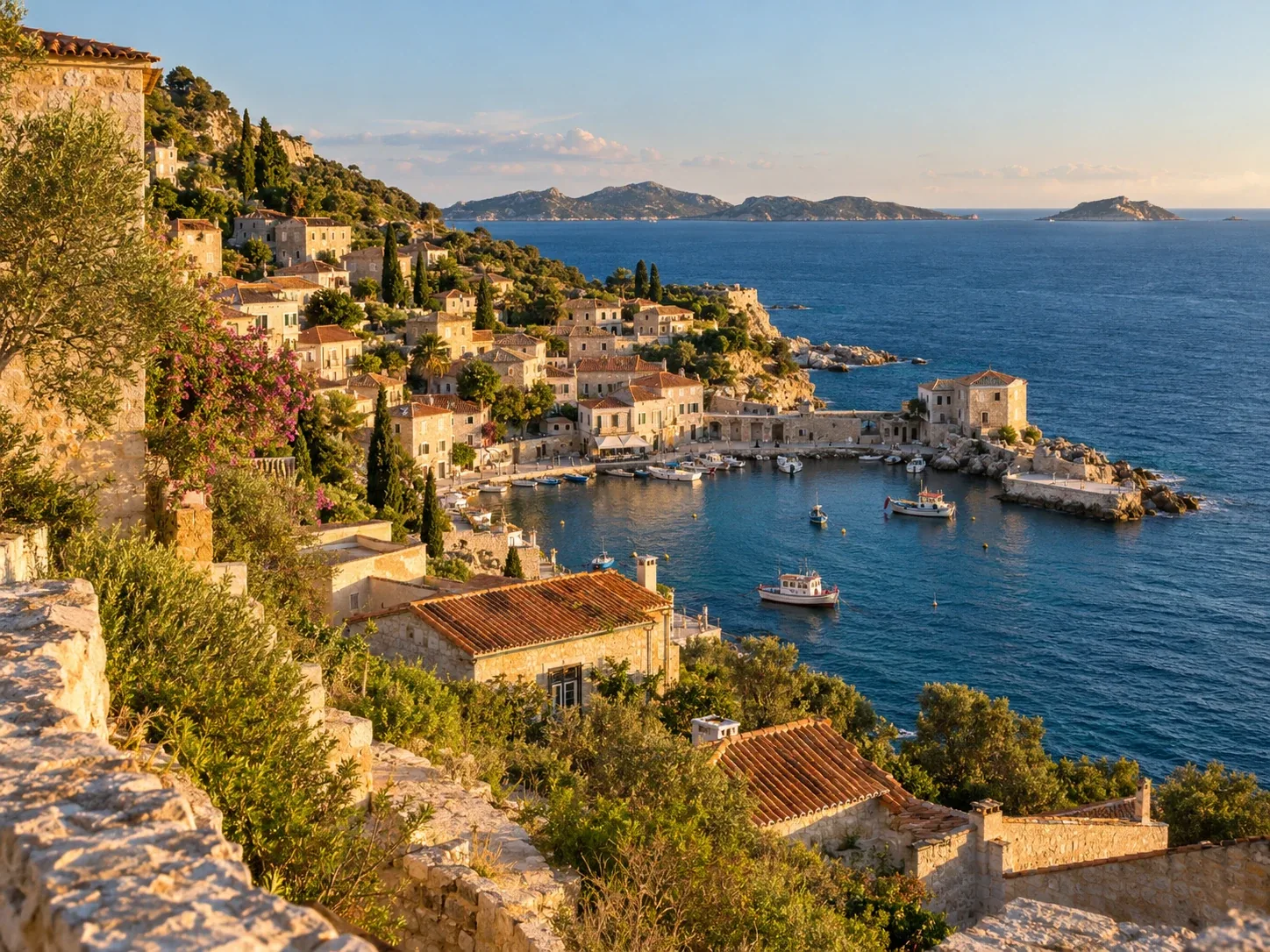
Create a realistic travel photograph to use as the source image for a fine-art poster experiment. Show an imaginary Mediterranean coastal town called Cala Bruna: pale limestone houses with terracotta roofs stepping down a hillside to a small crescent harbor, deep cobalt water, a few fishing boats, distant low islands, late-afternoon sun and long warm shadows. View from a quiet overlook, eye-level 35mm travel photography, natural imperfect details, no people in foreground, no signs or readable text, no borders, no collage, landscape 4:3 composition. Make it feel like an authentic photograph someone took on a trip, not an illustration.
The fictional place name gives the examples a consistent identity without relying on a real landmark or an uploaded personal photo. You can replace the scene with your own travel image; keep the same preserve/change structure and replace the named visual anchors.
Three poster treatments
| Treatment | Keep from the photo | Change in the poster |
|---|---|---|
| Rubber stamp | Harbor, town silhouette, island horizon | Reduce to a few ink colors and carved shapes |
| Architectural silkscreen | Building placement, shoreline, boats | Add measured lines, color fields, and a layered layout |
| Impasto diorama | Town, coast, and warm/cool palette | Rebuild the scene as raised, tactile paint |
1. Rubber-stamp field notes
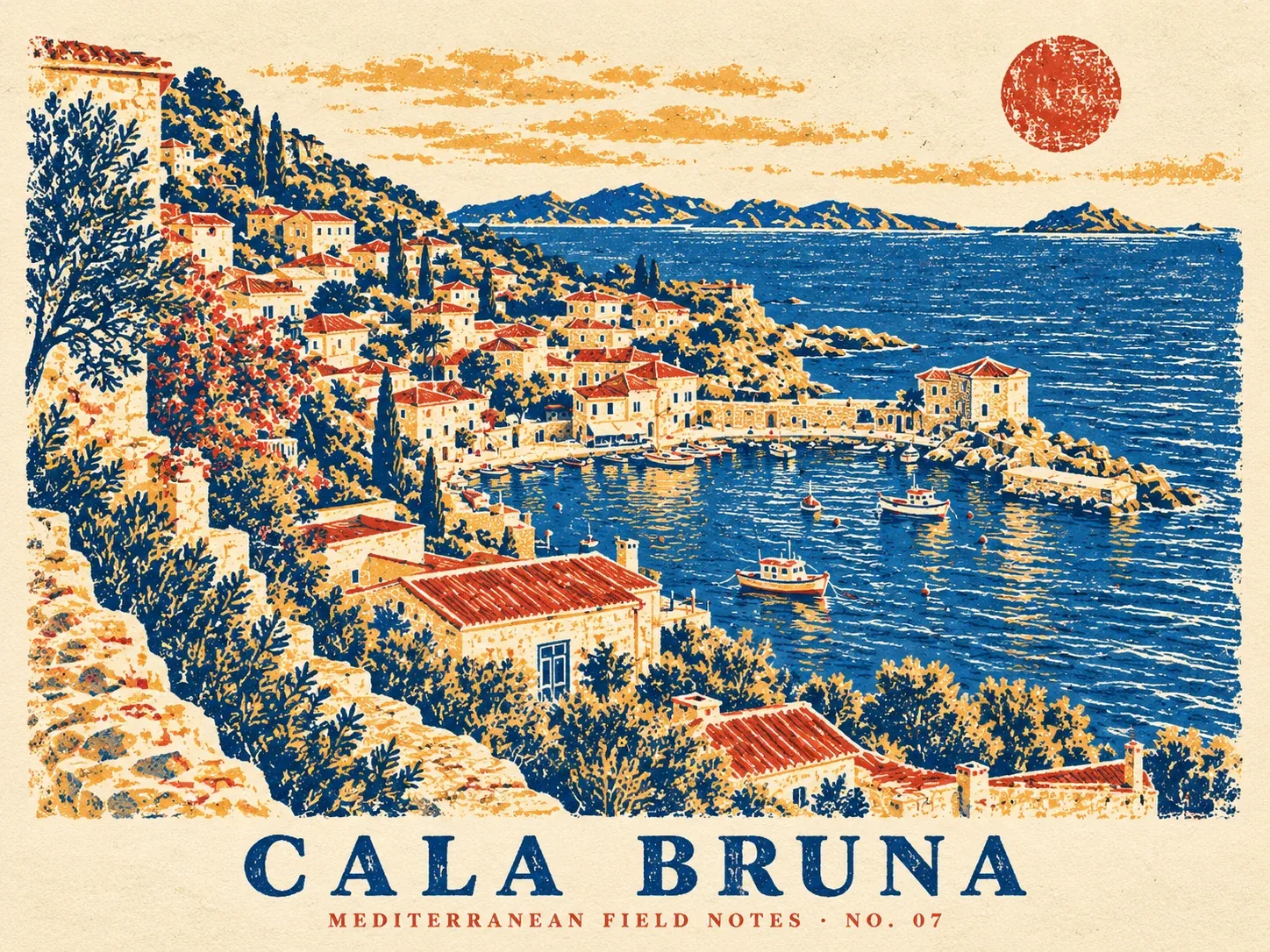
This prompt uses a tight ink palette and handmade print defects to push the photograph toward a carved stamp illustration. Short, quoted text makes the title more reliable than asking for a long block of poster copy.
Transform the travel photograph I just generated into a designed fine-art travel field-notes poster. Use that image as the only visual reference: keep the same Cala Bruna hillside, crescent harbor, fishing boats, island horizon, and late-afternoon light recognizable, but reinterpret them as a hand-carved rubber-stamp print on warm ivory archival paper. 4:3 landscape poster. Use only deep cobalt, brick red, muted ochre, and paper cream; visible ink grain, slight stamp misregistration, bold simplified shapes, generous paper margins. Arrange the harbor scene as a large central stamp illustration with a small secondary circular sun-stamp. Add only the exact legible title “CALA BRUNA” and small caption “MEDITERRANEAN FIELD NOTES · NO. 07”. Make it feel handmade and collectible, not like a photo with a filter. No extra text, no logos, no mockup frame, no collage.
Why it works: the prompt names the scene details that must survive, then gives the model a limited palette and a physical print process. “Not like a photo with a filter” asks for a real reinterpretation rather than a color overlay.
2. Architectural silkscreen study
The second direction keeps a photographic upper section and turns the lower area into a graphic study. The layout instructions describe the relationship between the two zones, while the short title and caption limit competing text.
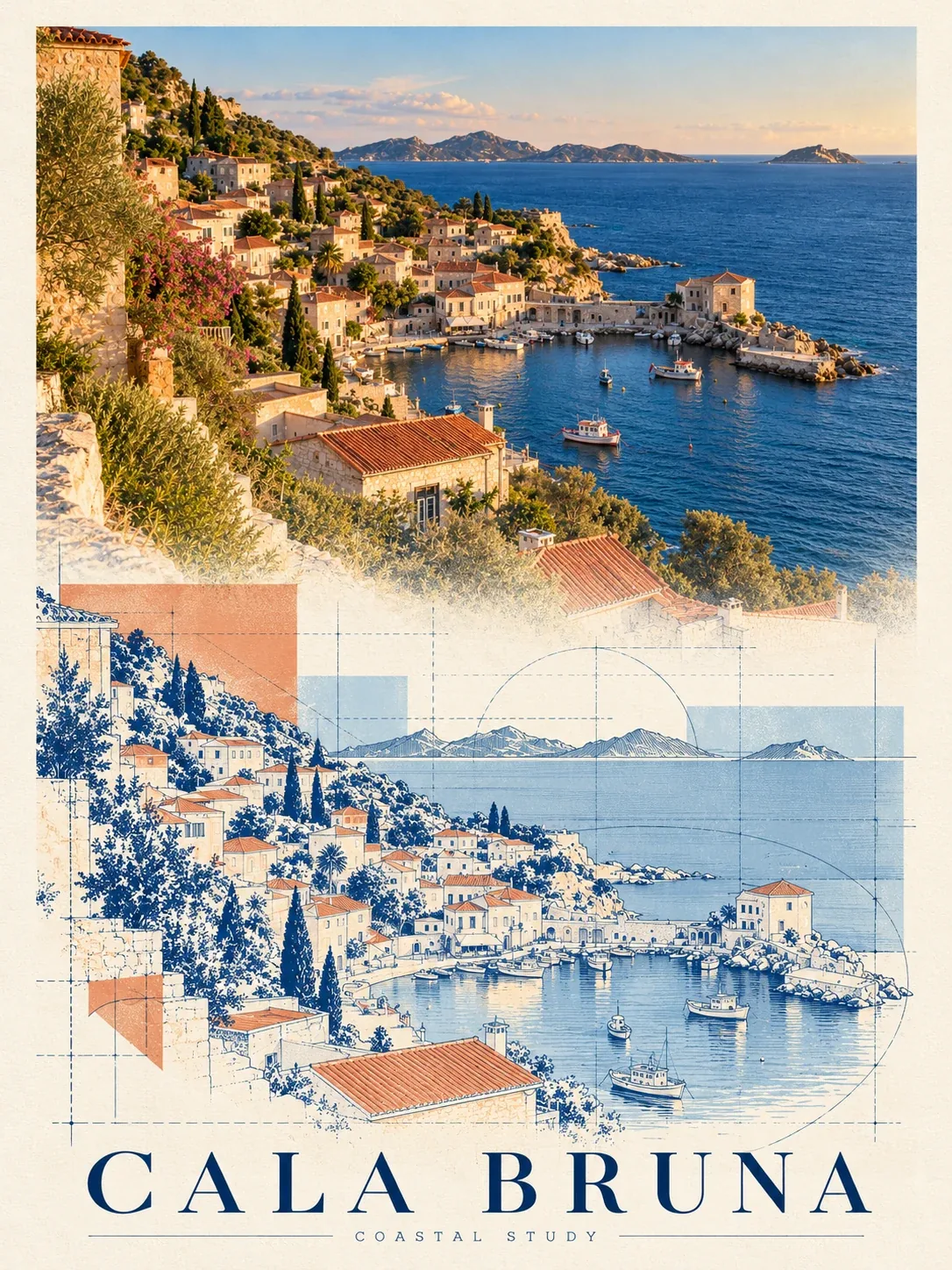
Using the attached original Cala Bruna travel photograph as the source (not the earlier poster), create a sophisticated 3:4 vertical fine-art travel poster. Preserve the recognizable harbor curve, hillside town, boats, and island horizon, but transform the lower half into a two-color architectural silkscreen study: thin cobalt drafting lines, simplified building elevations, measured grid marks, and translucent terracotta and pale-blue color fields. Keep the upper portion photographic and warm; blend into the graphic lower section with an intentional layered seam, not a hard collage border. Editorial Swiss travel-poster design, restrained asymmetry, generous ivory negative space. Include only the exact title “CALA BRUNA” and a small “COASTAL STUDY” caption. Crisp print texture, no extra labels, no fake logos, no frame.
Why it works: “lower half” gives the graphic study a clear job, while “preserve” anchors it to the source. If the two areas feel disconnected, specify where the seam sits and which empty region can be covered or extended.
3. Impasto memory diorama
For the final treatment, the coastal scene becomes a tactile paint relief. This example repeats the scene as a photographic memory and a painted interpretation, making the transformation visible in a single poster.
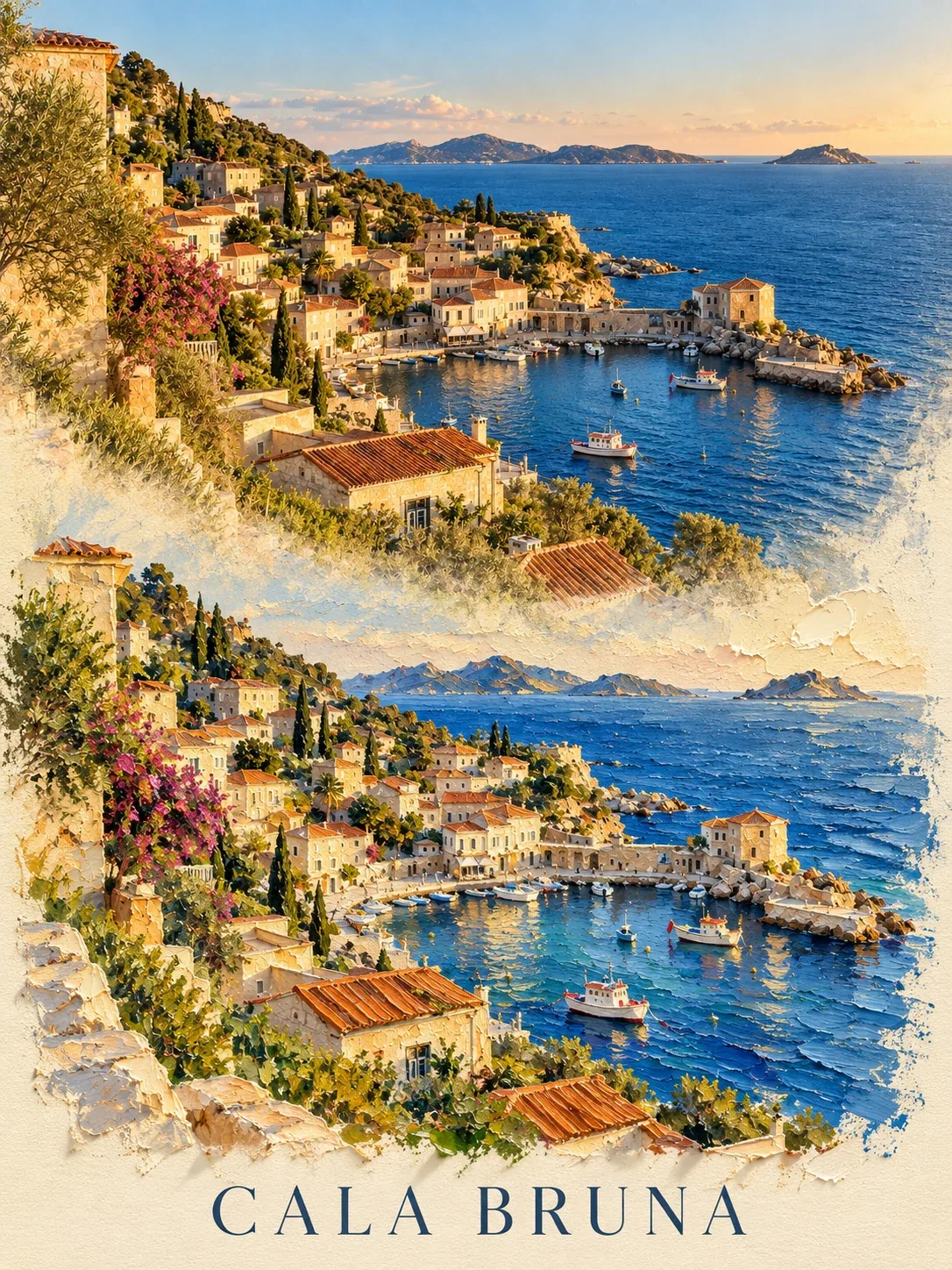
Create a 3:4 vertical fine-art poster by transforming the attached original Cala Bruna harbor photograph (do not use either previous poster as the source). Keep the same town silhouette, harbor curve, boat positions, island horizon, and late-afternoon color atmosphere recognizable. Reimagine the lower half as a tactile impasto memory diorama: the town and shoreline become a miniature relief made from thick palette-knife acrylic paint, with raised ridges, layered pigment, visible brush edges, and small dimensional shadows. The upper portion remains a cropped photographic memory that softly dissolves into the painted lower scene; design it as one unified poster, not two boxed panels. Palette: cobalt and ultramarine sea, warm terracotta roofs, pale stone, muted cream paper. Minimal editorial title “CALA BRUNA” and no other readable text. High-end gallery print, restrained layout, no frame, no extra objects.
Why it works: “palette-knife acrylic,” “raised ridges,” and “dimensional shadows” describe how the surface should behave, not just the mood. The result echoes the original scene in paint, so the doubled composition reads as memory and interpretation rather than an accidental duplicate.
Adapt the prompts to your own photo
- Choose a source with a dominant subject. A strong silhouette and clear foreground/background separation are easier to preserve.
- Name three to five anchors. Mention landmarks, object positions, or color relationships that should remain recognizable.
- Give the transformation a material. “Rubber-stamp print,” “architectural silkscreen,” and “impasto relief” produce more distinct results than broad labels such as “vintage” or “artistic.”
- Describe layout and aspect ratio. State whether the result is landscape or portrait and where the source scene belongs on the canvas.
- Keep text short. Quote exact wording and ask for no additional text. For important copy, add typography in a design tool after generation.
For another photo-based poster workflow, see Photo to Architectural Model Poster. Browse the GPT Image 2 prompt collection for more model-specific examples as they are added.
The three visual directions were inspired by Kohan’s travel-photo poster prompt system. The prompts and images on this page were created independently for PromptGenius.
Related Articles & Guides
 #gpt-image-2
GPT Image 2 Anime Poster and Mecha Key Visual Prompts
Build anime posters, mecha key visuals, pixel sprite sheets, and game screenshots with GPT Image 2 using layout budgets and identity locks.
 #gpt-image-2
GPT Image 2 Typography Poster Prompts
Create GPT Image 2 posters with real rendered text — letterform grounds, Swiss grids, archival hierarchy, signage, covers, and event key art.
#gpt-image-2GPT Image 2 Prompts and Workflows
Explore original GPT Image 2 prompts with generated examples for posters, art styles, composition studies, interface mockups, infographics, and photorealism.